Book Mark

Ike.ninja

Linux Fun
  • Home
  • How to
  • Reference Links
  • Categories
    • Releases
    • Plesk
    • Community
    • CMS
    • security
    • MYSQL
    • cPanel
  • Tools
    • IP Checker
    • Byte Converter
RSS

Three New Web Application Threats and their Solutions

Dec04
by Ike on December 4, 2018 at 7:00 am
Posted In: cross-site request forgery (CSRF), data tampering, IDOR, information disclosure, letsencrypt, parameter pollution, Plesk, Plesk Security, Product and technology, random session IDs, Releases, Security alerts, security extensions, session hijacking, spoofing, SQL injection, Sucuri Security Scanner, web application threats

Malicious users will try to access your web application without your consent. Therefore, you should implement the necessary security features to protect yourself from new web application threats: Spoofing, information disclosure and data tampering. Let’s see how together we can mitigate threats using Plesk security tools.

1. Spoofing

Spoofing

Spoofing is one of the modern web application threats, despite security measures you may implement back-end to protect users’ credentials. It’s pretending to be someone or something other than yourself. And it can happen in many ways.

Fake User Authentication

Attackers can create a fake login page similar to that of a web application to trick users to log in. So that they can steal users’ login credentials. For spoofing, attackers can even use SET (social engineering tools) to clone a login page of a popular web application.

Fake User Authentication

Cross-Site Request Forgery (CSRF)

Cross-site request forgery tricks a web browser into executing an unwanted action. Like transferring funds from one account to another account in a web application where a user is already logged in. Attackers usually use social engineering tricks to implement CSRF by sending links to authenticated users on social media. In other words, those already logged into a web application.

Then unsuspecting users end up sending a forged request to a server on behalf of a malicious user. Though it’s quite difficult to prevent this, below is how you can mitigate cross-site request forgery.

How to Prevent Spoofing Threats

  • Implement an SSL/TLS Certificate

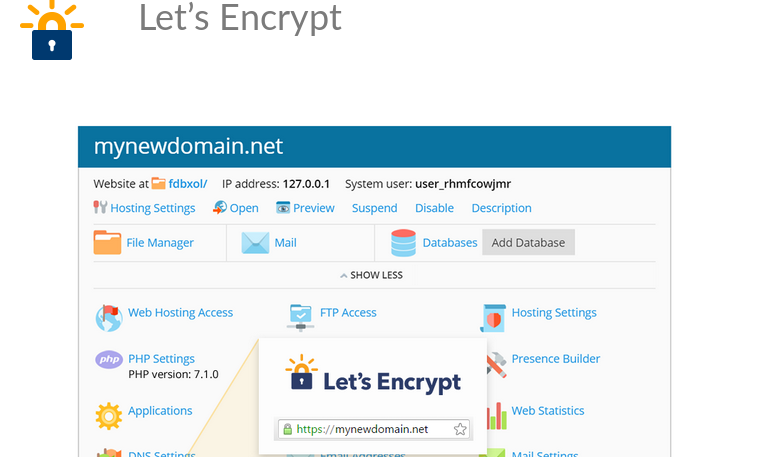
To defend against authentication spoofing, make sure that a web application such as banking portal has an SSL/TLS certificate in place. Plesk lets customers get these certificates for free in just a few clicks.
Spoofing Threat Prevention

Even less technical customers can use the Let’s encrypt extension on Plesk platform to easily create SSL certificates for their domains. And make it difficult for attackers to create spoofing attacks.

Generate Random Tokens  

Otherwise, to prevent forged requests, you can even use tokens to validate GET/POST requests from users. For example, to enable csrf protection in Flask-based applications, you can use the Flask extension CSRFProtect by enabling it globally.

from flask_wtf.csrf  import  CSRFProtect

csrf =  CSRFProtect(app)

Alternatively, you can use FlaskForm to prevent forgery request in flask web applications. However, the standard way of preventing CSRF threats in Java or PHP web applications is by implementing an anti-CSRF token only visible to the user’s browser and web application inside a session variable with a request. If the value of the session variable and hidden form field match, the user’s request is accepted.

2. Information Disclosure

Information Disclosure Threat

Allowing unauthenticated users to access documents restricted to only authenticated users can be defined as information disclosure. The following describe diverse ways information disclosure can take place.

IDOR – Indirect Object Reference

IDOR attack is possible when a web application provides direct access to the object based on a user-supplied input. It makes it possible for unauthorized users to access resources restricted to them. Let’s assume user A logs in to a banking web portal, then the user is redirected to the following url:

https://mybank.com/acc=00012345

In this case, 00012345 is user A’s account number. If the user wants to access other customers’ account details, user A just needs to change acc=00012345 to acc=000112367.

Therefore, the above action allows a user to access account details of another user without the owner’s consent.

How to prevent

There are different ways to prevent indirect object reference.  Another way to prevent exposure of real identifier to an internal object, like database record, is using a salted hash value to replace the identifier.

https://mybank.com/acc=00012345

https://mybank.com/acc=12eryrxhwgq

SQL Injection

SQL injection is one of the most common ways malicious users use to disclose information restricted from public view.  Attackers can send commands such as SELECT to download an entire database, CREATE to create new users in the database or UPDATE to modify accounts.

How to prevent

You can use prepared statements to prevent an attacker from changing the purpose of a query. A prepared statement separates the query from the data. Thus, the data submitted by an attacker can’t be used to modify the query. Moreover, for flask developers, you can also prevent SQL injection by using SQLAchelmy to interface with the database. It comes with features to prevent SQL injection threats.

3. Data Tampering

Data tampering is the act of intentionally modifying data through unauthorized channels. There can be two states of data: in transit and at rest. In both instances, malicious users can intercept and tamper with data. Here’s how data tampering can take place.

Parameter Pollution

Let’s assume a web application allows users to send sensitive data. Like login credentials or transact funds via GET and POST methods. In this case, an attacker can tamper with URL parameters and modify data.

To prevent parameter pollution threats in a web application, you need to encode user-supplied input whenever a user sends a GET/POST request to the backend server.

Session hijacking

Session hijacking

Session hijacking is also another type of attack where malicious users steal session cookies. Each user is assigned a session when they log into a web application. The sessionID is usually stored in a cookie. Attackers use session hijacking to modify data in transit from the client (web browser) to the web server.   

How to prevent: Generate Random Session IDs.

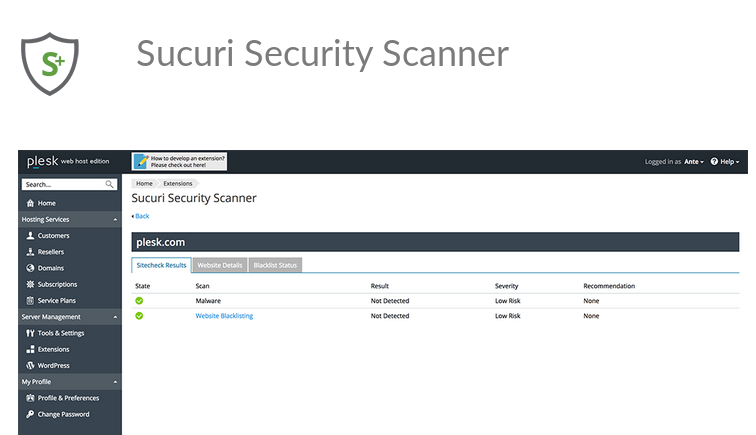
Moreover, Plesk also provides loads of security extensions for customers to prevent or mitigate threats not mentioned above. For example, the Sucuri Security Scanner extension on Plesk to remotely detect website security issues and weaknesses in the source code.
Sucuri Security Scanner on Plesk - Screenshot

Avoiding these new web application threats

Having said that, don’t just rely on Plesk extensions to protect web applications from web attacks. You also need to use your own secure coding practices to mitigate these threats. So, equip yourself, but stay vigilant.

The post Three New Web Application Threats and their Solutions appeared first on Plesk.

└ Tags: cross-site request forgery (CSRF), data tampering, IDOR, information disclosure, letsencrypt, parameter pollution, Plesk Security, Product and technology, random session IDs, Security alerts, security extensions, session hijacking, spoofing, SQL injection, Sucuri Security Scanner, web application threats
 Comment 

How to automate server protection with the Imunify Products Family

Dec04
by Ike on December 4, 2018 at 7:00 am
Posted In: CloudLinux, Imunify 360, Imunify Products Family, Imunify QuickPatch, ImunifyAV, Plesk, Product and technology, Releases, Security alerts

Running a web hosting business is … challenging. You need to host sites implemented with many different supporting technologies, covering a wide variety of business sectors. And you need to choose an all-encompassing, well-integrated security solution, with a particular focus on the needs of web hosters. The new Imunify Products Family is that solution.

CloudLinux built it with deep knowledge of the hosting industry’s problems: website integrity and security. Any of the following questions ever cross your mind?

  • How do you keep servers up to date with the latest security patches? And how do you do it automatically, with zero downtime and minimal intervention?
  • How do you ensure file systems and web applications are free of malware and viruses, not just when scanned, but all the time?
  • How do you protect systems from illegal infiltration without inconveniencing legitimate connections?

Let’s help answer these burning questions.

So what is the Imunify Products Family?

We can split them up into three distinct, but collaborative products.

  • Imunify QuickPatch
    Detects vulnerabilities in installed packages. Upgrade to Imunify QuickPatch+ to automatically fix them.
  • ImunifyAV
    A powerful and free malware scanner for websites. Upgrade to ImunifyAV+ to clean sites with one click.
  • Imunify360
    Complete, all-in-one, website security protection.

Together, they implement a complete security protocol using a simple, three-part strategy:

  1. Find:
    With accurate and fast detection of threats, minimizing or eliminating false-positives.
  2. Fix:
    One-click, trouble-free cleaning of malware and viruses.
  3. Protect:
    Powerful, permanent defense for websites against multiple attack vectors and threats.

Here’s how the components of the Imunify security suite implement this strategy.

Plesk Find

Find

There’s no way of being sure a system is free from malware without first scanning it. On a typical hosting server, half to one third of websites are infected. And most infections aren’t detected for 200 days or longer. A full, thorough scan is essential to set a baseline for backup and restore in the event of infection.

  • ImunifyAV scans and detects malware and viruses on your system. It’s efficient, doesn’t load your system, and is fully-automatic. It scans files, detecting many kinds of malicious content: backdoors, web-shells, viruses, hacker tools, ‘blackhat SEO’ scripts, phishing and more. It validates your domain reputation by checking against blacklist providers.

Keeping a system updated is the most widely cited advice for improving system security. Many breaches are the result of the exploitation of unpatched vulnerabilities.

  • Imunify QuickPatch scans and detects outdated and vulnerable packages. Then, gives instructions on how to remedy any issues found.
Plesk Fix/Repair

Fix

Security’s too important to leave to human procrastination. Fixing issues automatically is the future. Hackers automate many attacks, so malware cleanup must have the same approach.

  • ImunifyAV+ is the premium edition of ImunifyAV. It scans and detects malware, then cleans it with a one-click operation. You get a full report of anything found, in the dashboard or via email.

If this sounds familiar, it should. CloudLinux acquired Revisium because it is the most efficient and accurate malware scanner around. The Revisium Antivirus engine was renamed ImunifyAV and integrated into Imunify360.

  • Imunify QuickPatch has a Premium version, Imunify QuickPatch+, which automatically resolves system configuration and package issues.

QuickPatch was previously Opsani VCTR, which they acquired because it fit perfectly into the: Imunify Products family. The rebranding of Revisium and Opsani VCTR will continue as we knit them more tightly into the Imunify Security Suite. But you can be sure they’ll lose none of their original power and versatility.

Plesk Protection

Protect

No single technology can protect against sophisticated and coordinated cyber attacks. That is the credo behind the multi-layer security model implemented in Imunify360. Scanning and detection are not enough. You also need the following.

  1. An intelligent, AI-powered web application firewall (WAF), with ‘herd immunity’ rules, built by gathering and collating threat intelligence info from around the world. It should be condensed into efficient blocking rules with a low rate of false-positives.
  2. An effective intrusion and protection system (IDS/IPS).
  3. ‘Proactive Defense’, which scans web application PHP traffic ‘in-flight’, detecting and killing any requests with malicious intent.

And you need everything neatly packaged with a management console. Providing centralized incident management, reputation management, full system backup and restore facilities.

Getting Started with Imunify360 is easy

  • Imunify360 can be used for 30 days for free.
  • ImunifyAV is the free, powerful, malware scanner, built for Plesk and other control panels.
  • Imunify QuickPatch is a free package health checking software.

You can install all these products in under a minute, and start working right away, with zero configuration required.

Going further with the Imunify Products Family

  • ImunifyAV+ takes your malware cleanup struggle away. It does it all for you in a single click. You can even upgrade from free ImunifyAV at any time.
  • Imunify QuickPatch+ checks installed packages and keeps them up-to-date, constantly and automatically.

Maintaining a high level of system security doesn’t have to be a full-time job. Hackers automate their attacks and your defense should be automated too. That’s the key principle behind the comprehensive protection components in the Imunify Products Family.

CloudLinux - Imunify Products Family - Plesk

About CloudLinux

Headquartered in Palo Alto, California, CloudLinux is on a mission to make Linux-based web servers more secure, stable, and profitable. With over 450 years of Linux experience, +4,000 customers and partners including Dell and LiquidWeb, and +250,000 product installations globally. CloudLinux has a deep knowledge of the web hosting industry. Plus a dedicated talent pool of security-focused kernel developers, and a passion for excellence in customer care.

The post How to automate server protection with the Imunify Products Family appeared first on Plesk.

└ Tags: CloudLinux, Imunify 360, Imunify Products Family, Imunify QuickPatch, ImunifyAV, Product and technology, Security alerts
 Comment 

Ubuntu 3835-1: Linux kernel vulnerabilities

Dec04
by Ike on December 4, 2018 at 4:17 am
Posted In: Other

(Dec 3) Several security issues were fixed in the Linux kernel.

 Comment 

Ubuntu 3836-1: Linux kernel vulnerabilities

Dec04
by Ike on December 4, 2018 at 4:17 am
Posted In: Other

(Dec 3) Several security issues were fixed in the Linux kernel.

 Comment 

RedHat: RHSA-2018-3760:01 Important: ghostscript security update

Dec04
by Ike on December 4, 2018 at 4:17 am
Posted In: Other

(Dec 3) An update for ghostscript is now available for Red Hat Enterprise Linux 6. Red Hat Product Security has rated this update as having a security impact of Important. A Common Vulnerability Scoring System (CVSS) base score, which gives a detailed severity rating, is available for each vulnerability

 Comment 
  • Page 2,092 of 2,974
  • « First
  • «
  • 2,090
  • 2,091
  • 2,092
  • 2,093
  • 2,094
  • »
  • Last »

What’s New?

  • Ubuntu 18.04: USN-7907-5 Linux Kernel Important Security Flaws
  • Debian: Chromium Important DSA-6080-1 Code Exec DoS Issues
  • Fedora 42: SingularityCE Important Upgrade 4.3.5 – FEDORA-2025-54d78b9fed
  • Fedora 43: perl-Alien-Brotli Critical Security DoS Fix 2025-d93200cf16
  • Fedora 42: Wireshark 4.6.1 Critical Issue Advisory – FEDORA-2025-f810869906
  • Fedora 42: yarnpkg Command Injection Fix CVE-2025-64756 Advisory
  • Ubuntu 25.10: Linux Kernel Critical Flaws Security Patch USN-7906-3
  • Ubuntu 22.04: USN-7889-6 Linux Kernel Important Security Patch
  • Ubuntu 22.04 LTS: Linux Kernel Critical Security Issues USN-7928-3
  • Debian: Important DoS Vulnerabilities in FFmpeg DSA-6080-1 Advisory
  • Ubuntu 20.04 LTS: USN-7922-1 Linux Kernel Important Security Issues
  • Ubuntu 24.04 LTS: Kernel Important Security Fixes USN-7921-1 CVE-2025-39946
  • Debian: firefox-esr Critical Privilege Escalation DSA-6078-1 CVE-2025-14321
  • 2026 Global Partner Program Announcement
  • Debian: pdns-recursor Critical Denial of Service Vulnerability DSA-6077-1
  • Debian: libpng1.6 Critical Info Leak & DoS Vulnerabilities DSA-6076-1
  • Fedora 43: python3-docs Update 2025-e235793f10 – Maintenance Release
  • Fedora 43: python3.14 Critical Update Addresses Quadratic Complexity Bug
  • Debian: WordPress Important XSS and Info Disclosure DSA-6075-1
  • Ubuntu 22.04 LTS: fontTools Important Path Traversal Risk CVE-2025-66034
  • Debian: webkit2gtk Critical Info Exfiltration DSA-6074-1 CVE-2025-13947
  • Ubuntu 25.10: Radare2 Critical Memory Leak Security Advisory USN-7915-1
  • Fedora 41 ABRT Critical Command Injection Vulnerability Fix CVE-2025-12744
  • Fedora 42: mingw-libpng Important Heap Buffer Overflow Vuln 2025-9d0f04f316
  • Ubuntu: WebKitGTK High Remote Code Execution Threat USN-7914-1

Search

Translator

Tags

Business and industry code Community cPanel CVE Debian Debian Linux Distribution - Security Advisories Development Events Fedora Fedora Linux Distribution - Security Advisories General Hosting Important Advisory Linux Moderate Advisory Month in WordPress news Parallels Plesk Parallels Plesk Panel Performance PHP Plesk news and announcements Plesk Panel Podcast ProdDevSec Product and technology Products Project Release News Red Hat Red Hat Linux Distribution - Security Advisories Releases security Security Centre sensitive site Ubuntu Ubuntu Linux Distribution - Security Advisories update updates Various vulnerability Web Server Survey Wordpress wp-briefing

Posts

Helpful Links

  • Liquidweb.com
  • MYSQL Dev Documentation
  • Plugins
  • Source forge SED command
  • Themes
  • WordPress Documentation
  • You Tube
December 2025
M T W T F S S
« Nov    
1234567
891011121314
15161718192021
22232425262728
293031  
  • Google
  • Yahoo
  • Liquid Web
  • Storm
  • YouTube

©1999-2025 Ike.ninja | Powered by WordPress with Easel | Subscribe: RSS | Back to Top ↑

50 queries. 8.75 mb Memory usage. 0.617 seconds.