Book Mark

Ike.ninja

Linux Fun
  • Home
  • How to
  • Reference Links
  • Categories
    • Releases
    • Plesk
    • Community
    • CMS
    • security
    • MYSQL
    • cPanel
  • Tools
    • IP Checker
    • Byte Converter
RSS

RedHat: RHSA-2018-3595:01 Moderate: Red Hat Single Sign-On 7.2.5 security

Nov15
by Ike on November 15, 2018 at 2:20 am
Posted In: Other

(Nov 13) A security update is now available for Red Hat Single Sign-On 7.2 from the Customer Portal. Red Hat Product Security has rated this update as having a security impact of Moderate. A Common Vulnerability Scoring System (CVSS) base score, which

 Comment 

RedHat: RHSA-2018-3618:01 Important: flash-plugin security update

Nov15
by Ike on November 15, 2018 at 2:20 am
Posted In: Other

(Nov 14) An update for flash-plugin is now available for Red Hat Enterprise Linux 6 Supplementary. Red Hat Product Security has rated this update as having a security impact of Important. A Common Vulnerability Scoring System (CVSS) base score,

 Comment 

Changing up the Feedback System

Nov14
by Ike on November 14, 2018 at 7:00 pm
Posted In: Apache, CMS, Community, cPanel, Events, Products, Releases, security, System

cPanel’s support teams thrive on customer feedback. We work hard to ensure that we are meeting our customer’s expectations and providing them with the best experience. That begins with us trying to understand our customer’s reactions to the support that we provide. The best means of doing that is via our feedback system. We’ve decided to make a few changes to how customers leave feedback for our Technical Support and Customer Service teams. cPanel …

└ Tags: Products
 Comment 

Plesk on DigitalOcean is now a one-click app

Nov14
by Ike on November 14, 2018 at 1:22 pm
Posted In: Alex Konrad, cloud computing, Control Panel, Deployment, Designer, Developer, DigitalOcean, Droplet, Hyperscaler, IT-admins, Linux, Mass management, Plesk, Plesk Onyx, Product and technology, Releases, SSD performance, VM, Web Professionals

According to Alex Konrad, Forbes Editor of the Cloud 100 list, Cloud companies like DigitalOcean are revolutionizing how businesses reach their customers today. From digitizing painful old processes to allowing them more time to focus on what they really care about. This is what makes their products unique.

As a Web Professional (Developer, Agency owner, IT Admin) your goal is to provide valuable services to your customers. You want to be able to focus on the things you’re good at. And leave the nitty gritty of technical server management, cost streamlining, running instances, backups, and account management to a VPS. Because a virtual private server fits this purpose exactly. Tired of managing infrastructure and security, when what you want is to focus on coding and improving your product or service? Then Plesk Onyx is the ideal solution.

What is Digital Ocean?

We know DigitalOcean, founded in 2011, as a cloud infrastructure provider with a “developer first” mentality. They simplify web infrastructure for software developers and their mission is to smooth out the complexities of infrastructure. How? By offering one simple and robust platform for developers to easily launch and scale their applications. DigitalOcean is now the second largest and fastest-growing cloud computing platform of all public apps and websites, according to Netcraft.

Over 750,000 registered customers have launched more than 20 million Droplets combined on DigitalOcean. The company is now investing heavily in advancing its platform to further support growing teams and larger applications in production.

DigitalOcean cloud hosting
Image: DigitalOcean

Plesk on DigitalOcean

Plesk on DigitalOcean gives you a ready-to-code environment. So you can easily build, secure and run websites and apps that run and scale in the cloud.

Plesk manages and secures over 380,000 servers, automates 11 million websites and at least 19 million mailboxes. It’s the leading WebOps, Hosting and Web Server Control Panel to build, secure and run your applications, websites and hosting business. You’ll find it in 32 languages and 140 countries, with 50% of the top 100 worldwide service providers partnering with Plesk today.

Key Plesk Onyx Features

The versatile Plesk Onyx control panel
  • The WebOps platform

Manage all your domains, DNS, applications websites and mailboxes from one single platform.

  • DigitalOcean DNS – integrated into Plesk

The free Plesk DigitalOcean extension integrates Plesk with the DigitalOcean DNS service. This web service is highly available and scalable and you can use it as an external DNS service for your domains. The extension will automatically sync DNS zones between Plesk and DigitalOcean DNS. Here’s how:

  1. After installing Plesk, add your first domain/website.
  2. Then navigate to the domain and click “DigitalOcean DNS” for that domain.
  3. Enter your DigitalOcean API credentials into the extension. Or use OAuth to authorize your DigitalOcean account.
  4. Start having your domains in sync with Digital Ocean DNS.
  • Automated Server Administration

Easily manage your server, including automated updates, application deployment, monitoring, backups and maintenance.

  • User-Friendly Interface

One dashboard to manage multiple sites. Build websites, run updates, monitor performance, and onboard new customers from one place.

  • Security

Plesk on DigitalOcean secures  your applications and websites automatically.  You get a firewall, fail2ban and a web application installed and activated by default. Plus various additional options available on demand as Plesk Extensions. Or by simply upgrading to a Premium Plesk Edition.

  • Ready-to-Code Environment

Enable and manage multiple PHP versions and configurations, JavaScript, Perl, Ruby or Node.js, all in one-click. Every stack is deployed automatically and allows you to do custom configurations as you need.

  • Self-Repair Tools

We built automated healing and recovery functionality into Plesk, so many technical issues can self-repair without any need for support. This starts at fully-automated (safe) updates, including all OS components. And goes to various available manual self-repair tools up to a complete repair panel, in the unlikely event of something going wrong. Additionally, Plesk continuously monitors all relevant system components’ health, and provides notifications to the administrator before something goes wrong.

  • Multi-Language support

Plesk is available in 32 languages.

  • Plesk Extensions

Plesk  is a super-light application, automating all your server components and management needs on Lightsail in a single environment. As your business needs grow, you can use the in-app Plesk Extensions catalog to enable additional features on-demand. Many are free and some provide extra value when premium. Get access by clicking on “Extensions” inside Plesk itself.

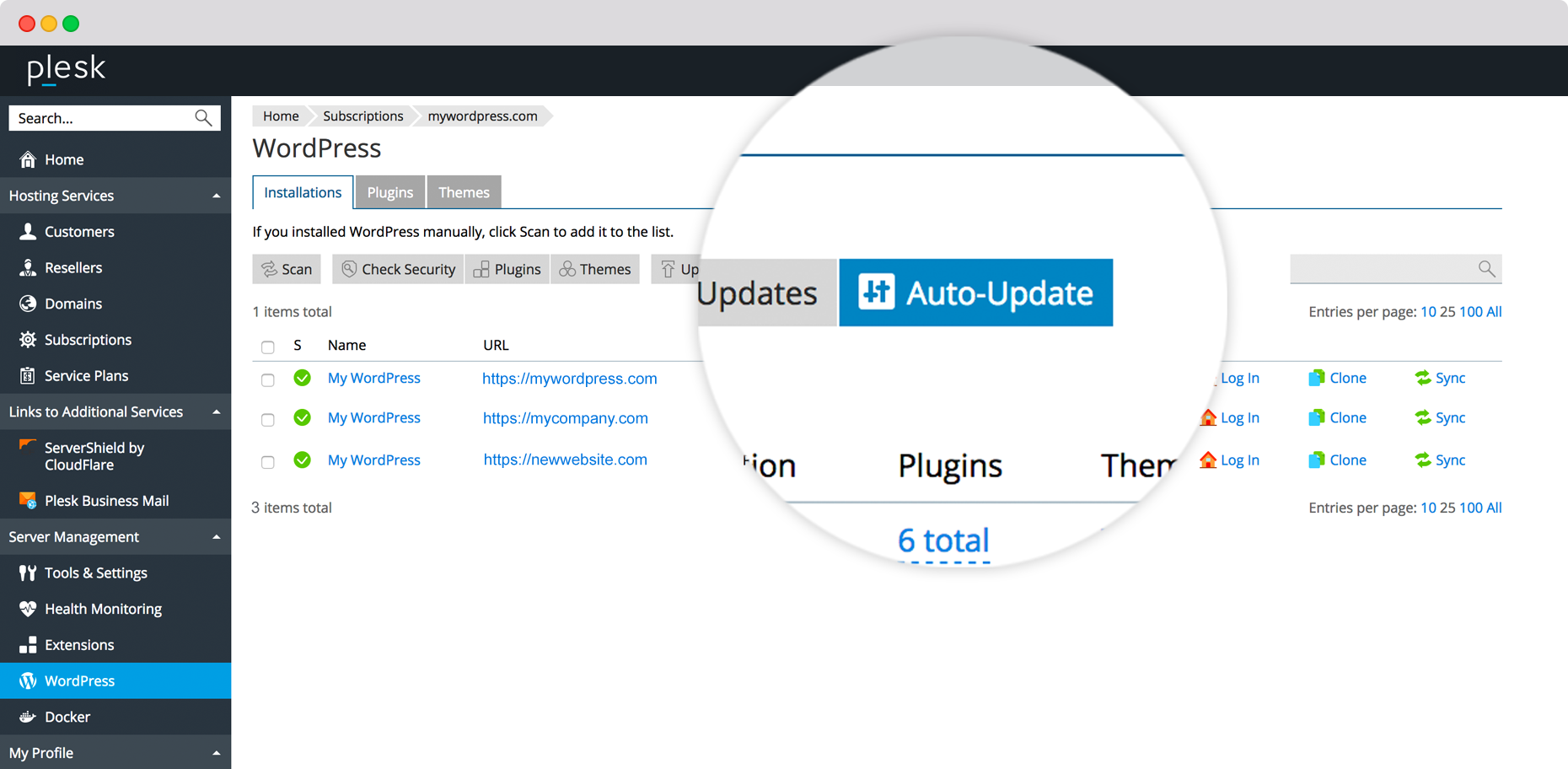
Plesk WordPress Toolkit – secure and simple

Staging environment best practices - Plesk WordPress Toolkit

Find full details on Plesk WordPress Toolkit here, but here are some key features below.

  • WordPress Simplified:

One-click installer to initialize and configure WordPress from start to finish. One dashboard to mass-manage multiple WordPress instances.

  • Secure Against Attacks

Hardens your site by default, further enhanced with the Toolkit’s security scanner. No security expertise necessary.

  • Run and Automate your WordPress

Singularly or mass-execute updates to the WP core, themes or plugins. Monitor and run all your WordPress sites from one dashboard.

  • Simple, but not Amateur

Get full control with WP-CLI, maintenance mode, debug management, search engine index management and more.

  • Stage and Test*

Test new features and ideas in a sandbox before pushing them to production – No plugins required, no separate server needed.

  • Cut Out Complexity*

Stage, Clone, Sync, Update, Migrate and more. Execute all these complex tasks with one click. No more high-risk activities or stressed-out dev teams.

  • Smart Updates powered by AI*

Smart Updates feature for WordPress Toolkit analyzes your WordPress updates and performs them without breaking your site. Otherwise, it will warn you the update may be dangerous.

  • One-Click Performance Optimized*

You can reach a maximum performance of your WordPress sites and no time and with great simplicity. Just enable NGINX caching in one click and combine with Speed Kit, powered by a distributed Fastly® CDN and Varnish cache.

*Some of these features are not available within the free Plesk Web Admin SE but require an upgrade to a higher value premium edition of Plesk or Plesk Extension.

Plesk on DigitalOcean (free) includes Plesk Web Admin Edition SE, a free version of Plesk with up to 3 domains and good for small websites and certain limitations. To gift yourself with a higher value Plesk edition, check out our Plesk Upgrades.
How to deploy Plesk on DigitalOcean

  1. First, log in to your DigitalOcean account.

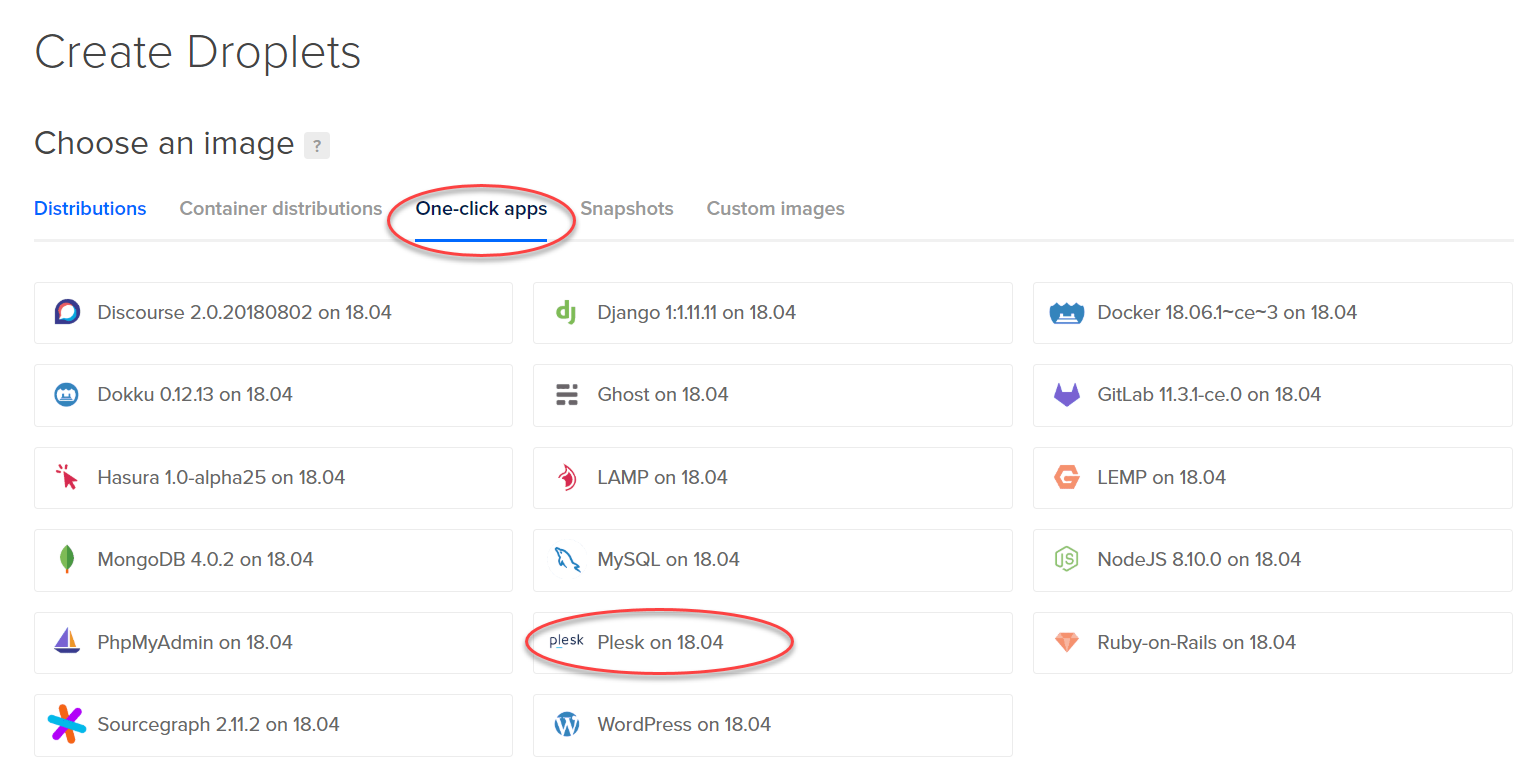
2. Then, from the main dashboard, click “Droplets” and “Create” -> “Droplets”.

Plesk on DigitalOcean now a one-click app - How to deploy - Create Droplet

3. Under “Choose an image”, click “one-click apps”

4. Select “Plesk”.

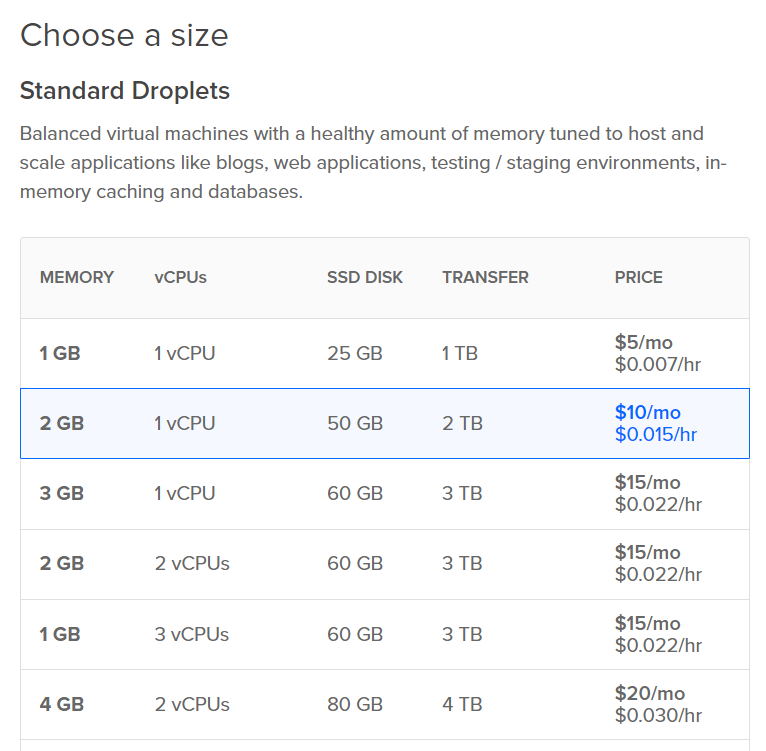
PLesk on DigitalOcean - Now a one-click app - Choose a size - Droplets

5. Choose your size and then a data center region.

Note: Plesk runs smoothly with 1GB RAM and 1 vCPU for smaller websites and environments. Running many websites or higher traffic requires a larger droplet size.
Please also refer to the Plesk infrastructure requirements for details.

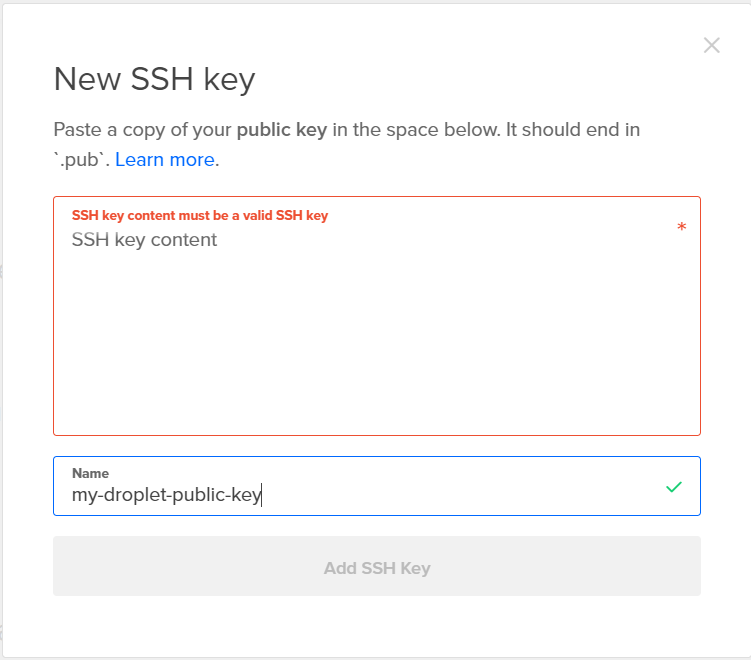
Plesk on DigitalOcean now a one-click app - New SSH key

6. Add your SSH keys

  • For Windows: download the latest putty client and use puttykeygen to generate an SSH key. Then copy/paste the public key that you generate with it.
  • For Mac: this tutorial shows a good option how to create the SSH keys.
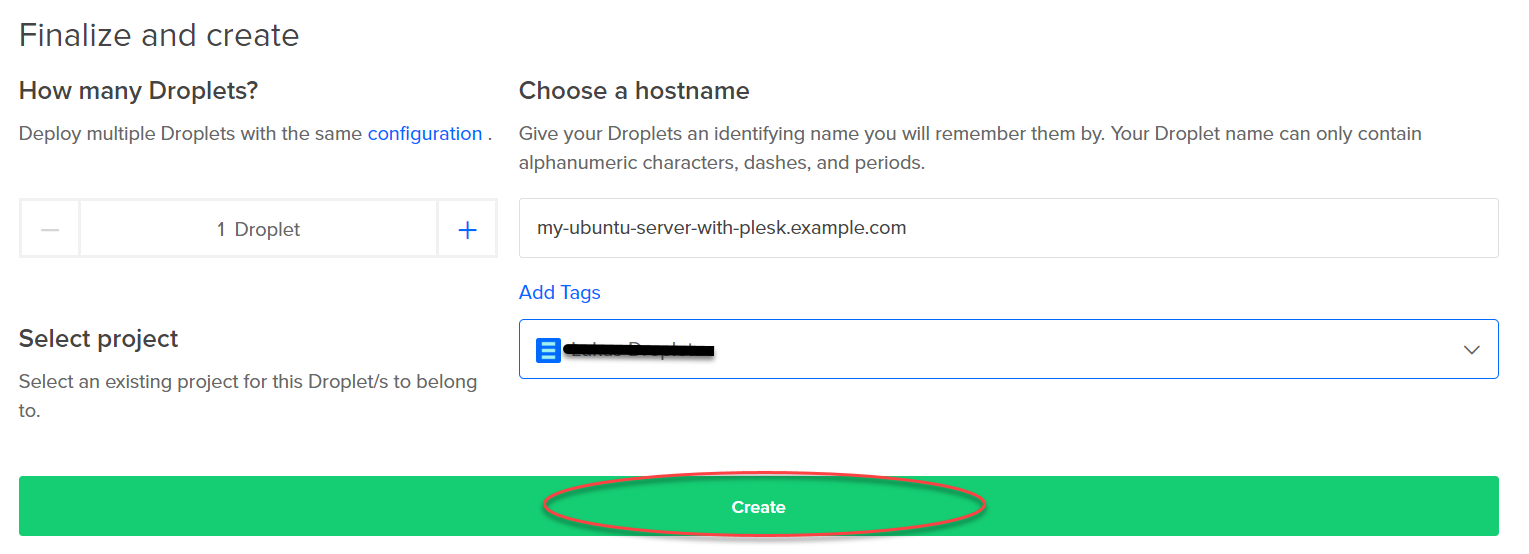
Plesk on DigitalOcean now a one-click app - Finalize and create Droplet

7. After adding and selecting your SSH key, go further below and click “Create”.

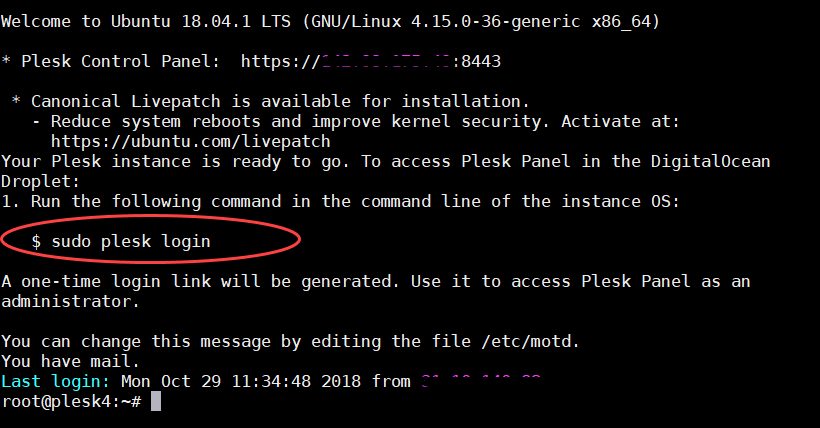
Plesk on DigitalOcean now a one-click app - How to deploy - sudo plesk login screenshot

8. Once your Droplet is created, go back to your favorite SSH terminal client on Windows or Mac.

Using the related private key you created, login to the new Droplet via its IP address. You copy it from the DigitalOcean interface.

9. Once arrived on the terminal, type the following command: sudo plesk login

Plesk on DigitalOcean now a one-click app - How to deploy - sudo plesk login screenshot 2

10. This generates you a hidden link to access your Plesk the first time. So you can create your web-based administrator login that you copy/paste into your browser

Important final deployment points

  1. Unless you have defined a hostname for your Plesk server in your DNS, please use the hidden link with the IP address, not the one with the hostname.
  2. The first time you log into Plesk, you’ll get an SSL / not secure warning in your browser that can be safely ignored. Because it’s secure with a self-signed certificate. As soon as you assigned a hostname to your Plesk server in the DNS, you can secure your Plesk panel using one-click Let’s Encrypt for free.
  3. After deploying a droplet with Plesk, it can take up to 2 min to finish running a set of post-install scripts through the image. During that time, you won’t be able to log in. So you need just a bit of patience 🙂

Check out the following for further information and helpful links:

Further Information & Helpful Links:

  • Plesk Documentation
  • Plesk University (free)
  • Plesk Editions & Upgrade to Web Pro and Web Host Editions
  • Plesk Support (24x7x365 in multiple languages)

Note:

The free Plesk Web Admin SE bundled on DigitalOcean droplets includes 30 days of free support. Afterward, either a support subscription or an upgrade to either a Web Pro or Web Host edition is required for continuous support.

The post Plesk on DigitalOcean is now a one-click app appeared first on Plesk.

└ Tags: Alex Konrad, cloud computing, Control Panel, Deployment, Designer, Developer, DigitalOcean, Droplet, Hyperscaler, IT-admins, Linux, Mass management, Plesk, Plesk Onyx, Product and technology, SSD performance, VM, Web Professionals
 Comment 

Debian: DSA-4339-1: ceph security update

Nov14
by Ike on November 14, 2018 at 2:33 am
Posted In: Other

(Nov 13) Multiple vulnerabilities were discovered in Ceph, a distributed storage and file system: The cephx authentication protocol was suspectible to replay attacks and calculated signatures incorrectly, “ceph mon” did not validate capabilities for pool operations (resulting in potential

 Comment 
  • Page 2,107 of 2,975
  • « First
  • «
  • 2,105
  • 2,106
  • 2,107
  • 2,108
  • 2,109
  • »
  • Last »

What’s New?

  • Fedora 41: Apptainer CVE-2025-65105 Security Fix Advisory
  • Fedora 43: Apptainer 1.4.5 Important Fix CVE-2025-65105
  • Ubuntu 18.04: USN-7907-5 Linux Kernel Important Security Flaws
  • Debian: Chromium Important DSA-6080-1 Code Exec DoS Issues
  • Fedora 42: SingularityCE Important Upgrade 4.3.5 – FEDORA-2025-54d78b9fed
  • Fedora 43: perl-Alien-Brotli Critical Security DoS Fix 2025-d93200cf16
  • Fedora 42: Wireshark 4.6.1 Critical Issue Advisory – FEDORA-2025-f810869906
  • Fedora 42: yarnpkg Command Injection Fix CVE-2025-64756 Advisory
  • Ubuntu 25.10: Linux Kernel Critical Flaws Security Patch USN-7906-3
  • Ubuntu 22.04: USN-7889-6 Linux Kernel Important Security Patch
  • Ubuntu 22.04 LTS: Linux Kernel Critical Security Issues USN-7928-3
  • Ubuntu 22.04: 7928-2 Linux Kernel FIPS Security Updates
  • Ubuntu 22.04 LTS: USN-7928-1 Linux Kernel Critical Security Issues
  • Debian: Important DoS Vulnerabilities in FFmpeg DSA-6080-1 Advisory
  • Ubuntu 20.04 LTS: USN-7922-1 Linux Kernel Important Security Issues
  • Ubuntu 24.04 LTS: Kernel Important Security Fixes USN-7921-1 CVE-2025-39946
  • Debian: firefox-esr Critical Privilege Escalation DSA-6078-1 CVE-2025-14321
  • 2026 Global Partner Program Announcement
  • Debian: pdns-recursor Critical Denial of Service Vulnerability DSA-6077-1
  • Debian: libpng1.6 Critical Info Leak & DoS Vulnerabilities DSA-6076-1
  • Fedora 43: python3-docs Update 2025-e235793f10 – Maintenance Release
  • Fedora 43: python3.14 Critical Update Addresses Quadratic Complexity Bug
  • Debian: WordPress Important XSS and Info Disclosure DSA-6075-1
  • Ubuntu 22.04 LTS: fontTools Important Path Traversal Risk CVE-2025-66034
  • Debian: webkit2gtk Critical Info Exfiltration DSA-6074-1 CVE-2025-13947

Search

Translator

Tags

Business and industry code Community cPanel CVE Debian Debian Linux Distribution - Security Advisories Development Events Fedora Fedora Linux Distribution - Security Advisories General Hosting Important Advisory Linux Moderate Advisory Month in WordPress news Parallels Plesk Parallels Plesk Panel Performance PHP Plesk news and announcements Plesk Panel Podcast ProdDevSec Product and technology Products Project Release News Red Hat Red Hat Linux Distribution - Security Advisories Releases security Security Centre sensitive site Ubuntu Ubuntu Linux Distribution - Security Advisories update updates Various vulnerability Web Server Survey Wordpress wp-briefing

Posts

Helpful Links

  • Liquidweb.com
  • MYSQL Dev Documentation
  • Plugins
  • Source forge SED command
  • Themes
  • WordPress Documentation
  • You Tube
December 2025
M T W T F S S
« Nov    
1234567
891011121314
15161718192021
22232425262728
293031  
  • Google
  • Yahoo
  • Liquid Web
  • Storm
  • YouTube

©1999-2025 Ike.ninja | Powered by WordPress with Easel | Subscribe: RSS | Back to Top ↑

51 queries. 8.75 mb Memory usage. 0.272 seconds.