Book Mark

Ike.ninja

Linux Fun
  • Home
  • How to
  • Reference Links
  • Categories
    • Releases
    • Plesk
    • Community
    • CMS
    • security
    • MYSQL
    • cPanel
  • Tools
    • IP Checker
    • Byte Converter
RSS

Another way to make sites load faster

Jul24
by Ike on July 24, 2018 at 7:45 am
Posted In: Baqend, page load, Plesk, Product and technology, Releases, Speed Kit, web performance

Web performance is critical for business success. Because users simply leave a page when loading takes too long. Although conversion rates, user satisfaction, and more pivotal measures suffer from slow page loads, even modern websites feel sluggish.

Because lost time means lost users

Cognitive science suggests people start losing focus after just one second. Above that one-second threshold, users divert their attention elsewhere. Maybe some will be patient and wait for your page to load. However, the overwhelming majority will abandon their tasks.
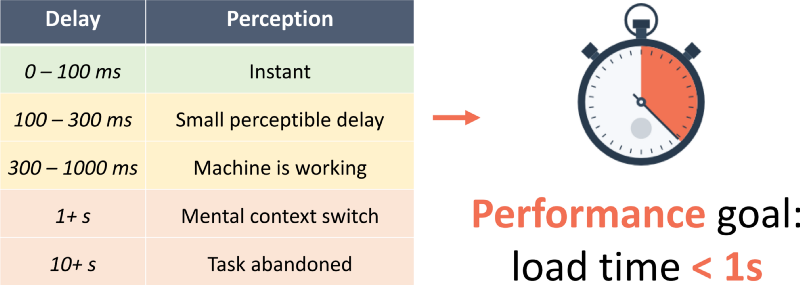
baqend performance goals - Plesk and Baqend Speed Kit
Ilya Grigorik, “High performance browser networking“ (2013)

How fast does your website feel?

Before you start optimizing your page loads, you first need to measure how fast they actually are. Typical web performance metrics relate to the Time To First Byte (TTFB), DomContentLoaded, or other technical aspects of the page load. While those measurements help your engineers to perform diagnostics or low-level optimizations, they don’t tell you how fast your website feels to customers.

Because user-perceived performance depends on when the first relevant content is displayed. Or when the user can start interacting with the page. The time until the First Meaningful Paint (FMP) is a performance metric that aims to quantify this subjective part of user experience.

Moreover, the FMP captures how long it takes for the first important page elements to appear. Like, the headline and text in a blog, or the search bar and product overview in an e-shop. We define FMP as the moment when one experiences the greatest visual change. Since identifying the greatest visual change requires video analysis, you need a sophisticated tooling to measure FMP.

Can you track user-perceived performance?

Thankfully, extensions like Plesk’s new Speed Kit, can help you monitor and boost web performance in a couple of clicks. It comes with its own FMP measurement tool. So as soon as you install the extension, it analyzes all your Plesk websites. For each one, Speed Kit generates a performance report and captures the loading process on video.
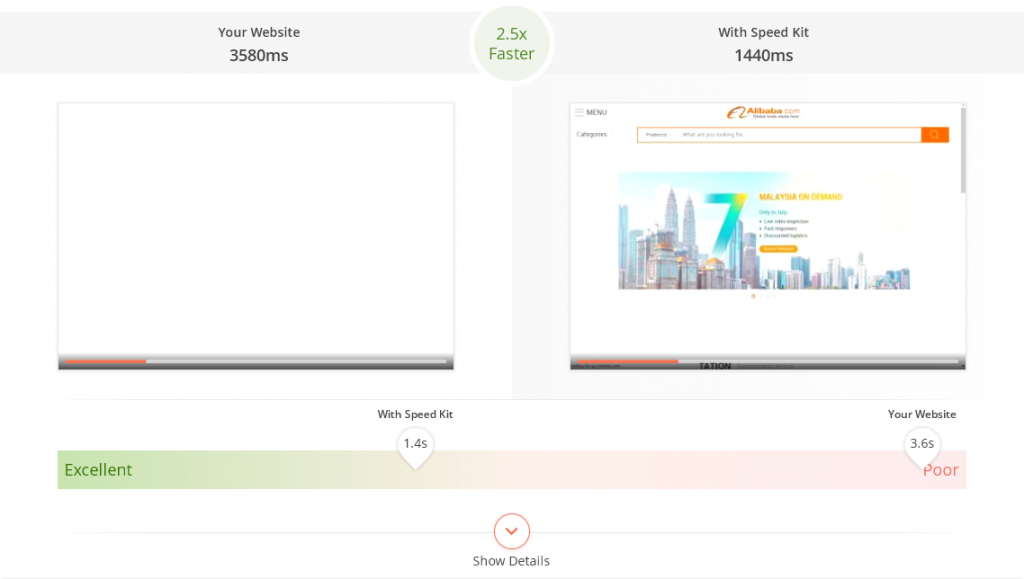
baqend-speed-kit-screenshot-video

The video shows how fast the current page load is (left) and how fast it could be (right) with optimizations. In the details, you can find performance hints that briefly describe the possible optimizations, and how they affect performance. You can resolve your performance issues by implementing these hints yourself. Or you can activate Speed Kit for a particular domain and let it do the work for you.

The Speed Kit Extension also helps you track the FMP for all your individual domains. By checking Speed Kit’s overview panel, you can keep an eye on whether your customers feel your website‘s fast. The extension will tell you whether your websites’ FMPs are already optimized. Or whether you‘re losing valuable time on page load.

Let Speed Kit auto-optimize and boost your page loads

Speed Kit doesn’t just estimate possible site performance improvements, but also implements them and measures the actual uplift. It works with any website and can be activated in three steps.

(1) click on Install Speed Kit
(2) click on Configure Speed Kit
(3) follow the instructions provided by the Speed Kit Wizard.

For WordPress users, installation is even simpler. Watch how to optimize your page using 1-click installation for WordPress websites:

Speed Kit applies top technology to your site, like transparent image optimization, CDN caching, warm HTTP/2 connections, and more. Try it – and accelerate your Joomla, Typo3, or custom website.

Page load time is money

Losing time in the web means losing money in business. It’s hard to find performance bottlenecks and even harder to fix them. But with Plesk and Speed Kit, you can do both!

The post Another way to make sites load faster appeared first on Plesk.
└ Tags: Baqend, page load, Product and technology, Speed Kit, web performance
 Comment 

Our PHP versions popularity research – and unexpected results

Jul23
by Ike on July 23, 2018 at 7:30 am
Posted In: outdated PHP versions, PHP, PHP 7.0, PHP 7.2, PHP Upgrade, Plesk, Plesk news and announcements, Plesk php, Releases

The hosting industry is linked to PHP as more than 80% of all the websites on the Internet use this programming language. This affects the development of any hosting software, including control panels like Plesk. We make a product for server management automation, creating and configuring websites and applications. And therefore, for using PHP. One of our key tasks at Plesk is to continue support of outdated PHP versions.

The PHP Version Problem

The hosting industry, like any large market, is quite inert. So transition to new PHP occurs very slowly. Even though Plesk provides users with the latest PHP versions within 48 hours of their release, millions of sites continue working on older versions. Hence, solutions that can provide their support are still in high demand. That’s why Plesk continues to support EOLed-brunches from PHP 5.5 to PHP 5.2 inclusive.

At the same time, we realize that outdated PHP versions pose risks of not just poor performance and functionality, but also vulnerabilities. Ones that can occur at any moment and cost the site owner a lot. You should be pushing your clients to upgrade to at least PHP 5.6. Because, in case of vulnerability like in PHP 5.2, this can cause hacking of thousands of sites. And you’ll get blame for using unsafe software.

Therefore, starting with the new Plesk Onyx 17.8 version, released in March 2018, obsolete PHP versions are marked as outdated in the UI.

We decided we could stop supporting the old PHP completely – if only we were sure the percentage of sites running it was negligible. You know, so as not cause frustration among users. For this reason, we researched which PHP versions are most popular among Plesk users.  The results were quite curious.

No country for old men?

We started analyzing stats available for the last two releases of Plesk Onyx. Thus covering about 15% of sites running on these Plesk versions. Old Plesk versions users probably also use older PHP, but that’s not really a problem for us. What we’re really interested in are the preferences of those using the latest Plesk versions. And therefore being the most loyal to the product of the audience.

We can’t make customers who run unsupported versions of the product on unsupported operation systems to update. Moreover, in their situation, old PHP is probably not the biggest problem. Eventually these users will have to switch to new versions of Plesk. And their sites will also be available for our analytics.

Our latest PHP Versions Research Results

Currently the latest versions of PHP are 7.1 and 7.2. They are actively supported by the vendor. So reported bugs and security issues are fixed and regular point releases are made. Versions 5.6 and 7.0 are marked by the vendor as “security fixes only”. These branches are supported for critical security issues only. New releases are only made on an as-needed basis.

Finally, PHP 5.4 and 5.5 haven’t been supported since 2016. And their users are advised to upgrade as soon as possible in order to avoid possible security vulnerabilities. Let’s see whether users actually follow these recommendations. And ultimately, what scares our users most: updating their PHP or becoming a victim of potential vulnerability.

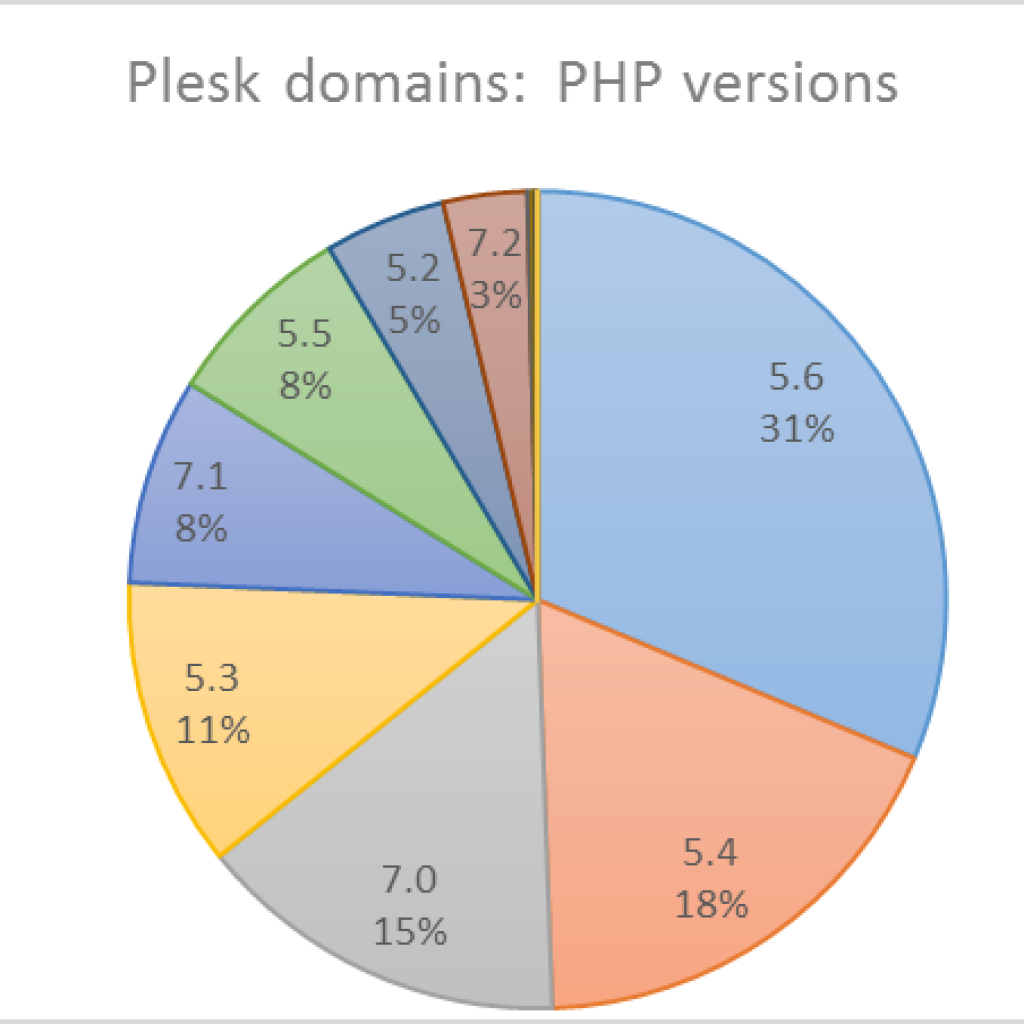
Today the ratio of PHP versions for all sites of our sample looks like this:

As you can see, the overall picture is not so good. The latest versions 7.1 and 7.2, which are recommended by the vendor, don’t even make top 3. Rather, they’re lagging behind. This begs the question: how much does this picture differ from country to country? The largest countries where Plesk popularity has traditionally been high are Germany, the USA and Spain. Let’s start with them.

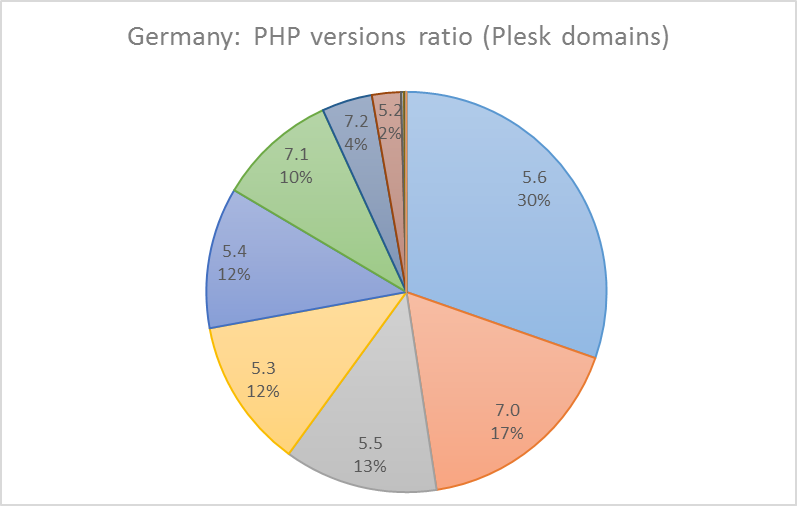
Germany

Germany is in no hurry to update PHP. The latest versions aren’t very popular (only 14% domains in total). However, the situation in Germany is better than the worldwide one. With PHP 7.0 taking second place instead of third – one good point.

USA and Spain

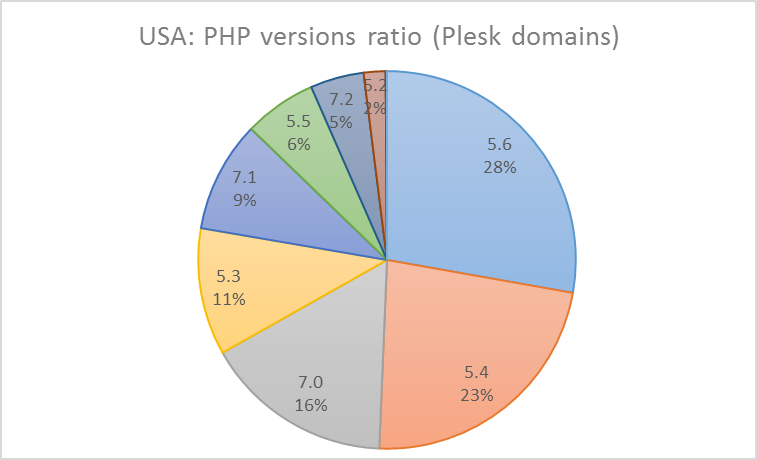
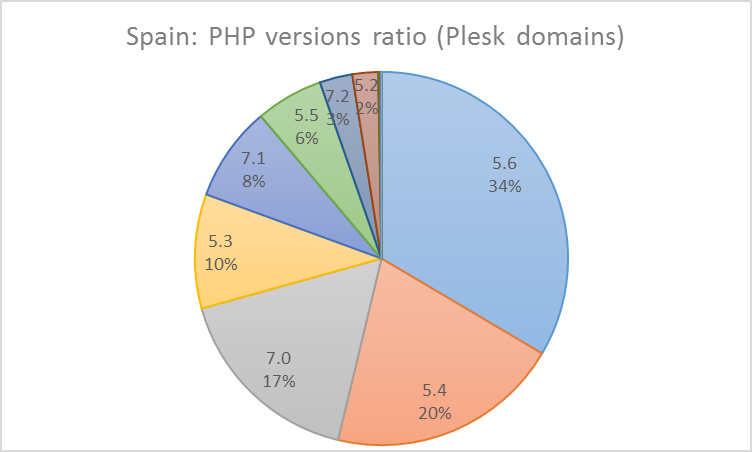
The United States appeared to be even more conservative than Germany. The situation here is very similar to the worldwide ratio (but in the USA, to its credit, PHP 7.2 share exceeds the PHP 5.2 one). Meanwhile, the situation in Spain isn’t too different from US.

popular PHP Plesk versions in USA

PHP 5.6, 5.4 and 7.0 also form the top-3 in Great Britain and France. Is there anything else we can be interested in? Of course, there is! Let’s look at some countries where our customers turned out not to be so predictable.

Lithuania

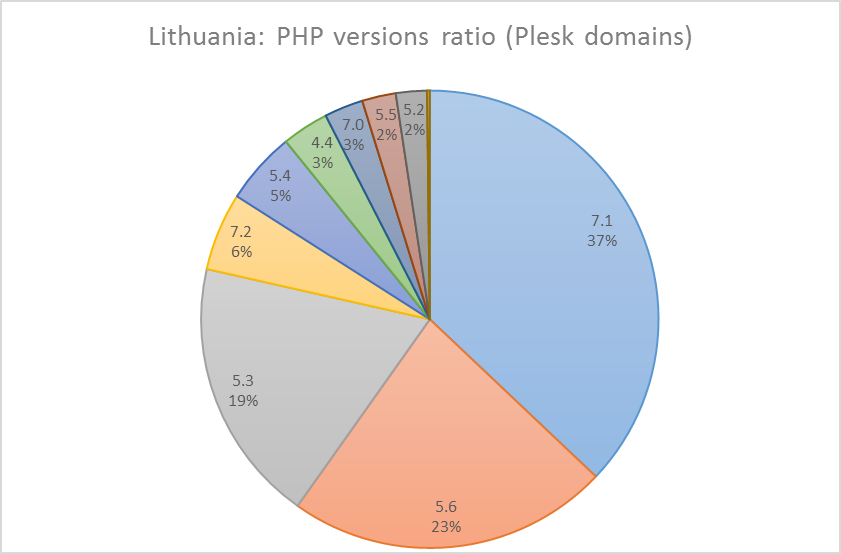
The trendiest country in our sample is Lithuania. PHP 7.1 is on the top for this version. Which is recommended by vendor as the actively supported one. This is the best result among the considered countries. Nowhere else do we see this version, as well as PHP 7.2, emerge as a winner.

popular Plesk PHP versions in Lithuania

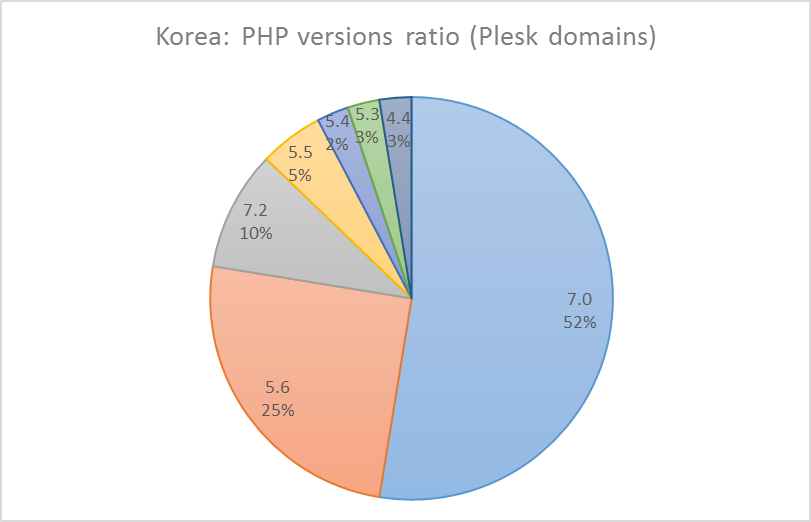
Next in our leaderboard are Korea, Denmark and Sweden with PHP 7.0 as the most popular version.

Korea

A whole 52% of Korean domains working on Plesk use PHP 7.0.

popular Plesk PHP versions in Korea

Denmark and Sweden

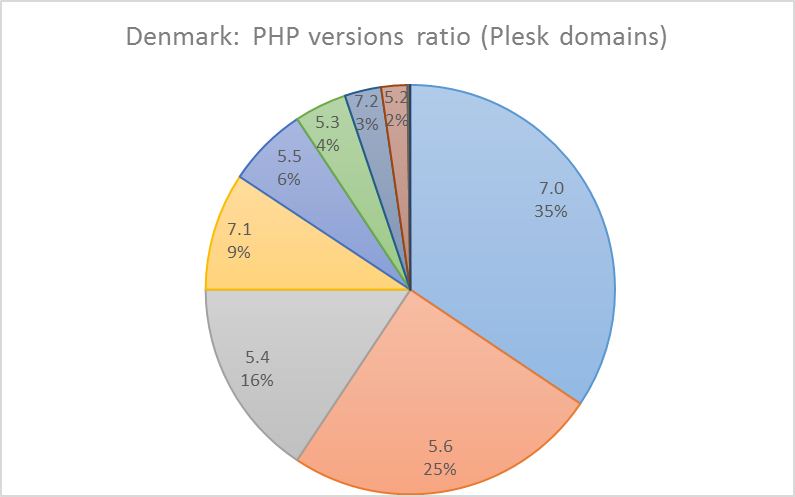
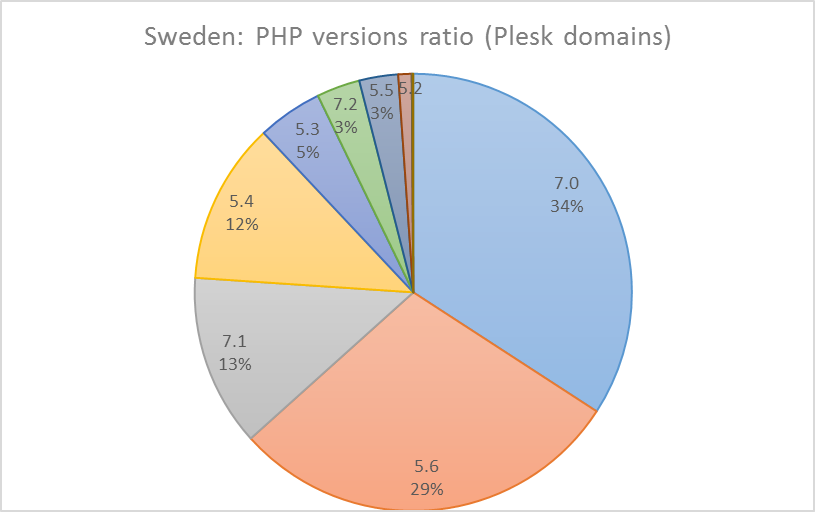
In Denmark, PHP 7.0 walks ahead by not so large a margin as in Korea – with only 35% of domains. Most domains in Sweden are relatively safe. Because 79% of them are working on up-to-date PHP versions from 5.6 to 7.2. Keep it up, Sweden!

popular Plesk PHP versions in Denmark
Popular Plesk PHP versions - Sweden

Netherlands and Japan

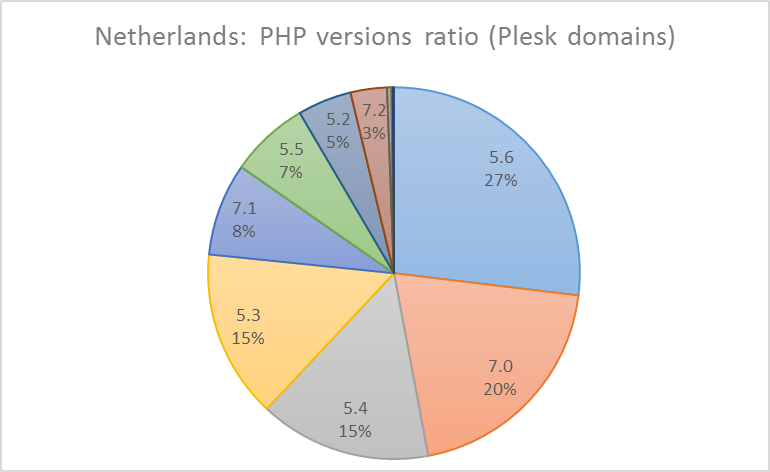
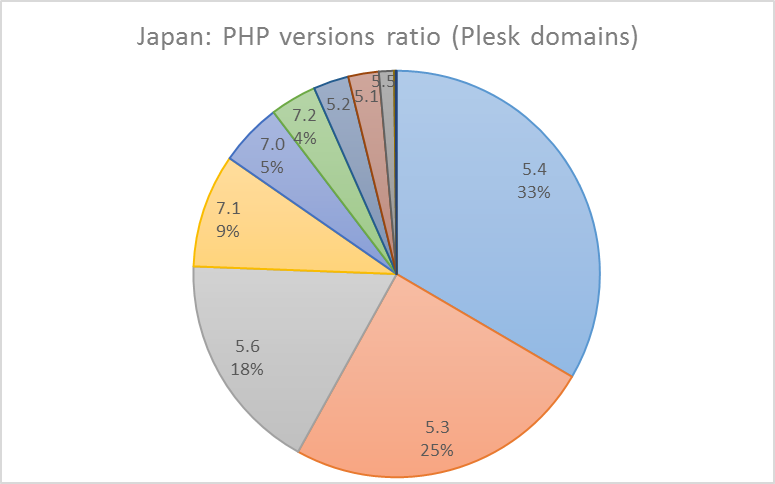
Netherlands showed a good result too. PHP 7.0 took the second place here. We can’t help but mention those countries where, for some reasons, the latest PHP versions are not popular. One of these countries, surprisingly, is Japan. Here, the most common PHP version is 5.4, followed by 5.3.

Popular Plesk PHP versions - Netherlands
Popular Plesk PHP versions - Japan

Other European countries

We detected a rather retrograde picture in Latvia, where the most popular version is PHP 5.4. PHP 5.3 in Greece and Russia, and PHP 5.2 in the Czech Republic.

China

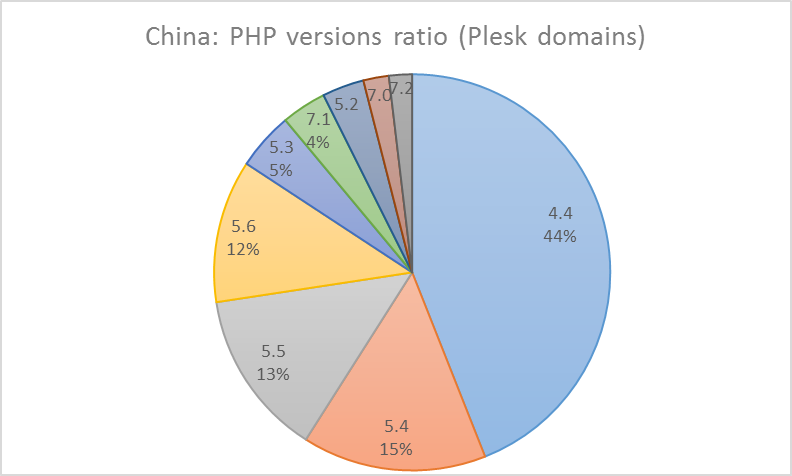
However, everything pales in comparison with China where 44% of sites work on PHP 4.4! We’ve seen nothing like this in any other country.

In total, 80% of Chinese sites use an outdated PHP. We also found this high popularity of old PHP in Japan and Mexico – with 63% for both.

The rating of the most ‘conscious’ countries with the largest share of PHP 5.6+ is headed by South Korea – 87% of sites. The second place is occupied by Sweden (79%), and third by Denmark (72%).

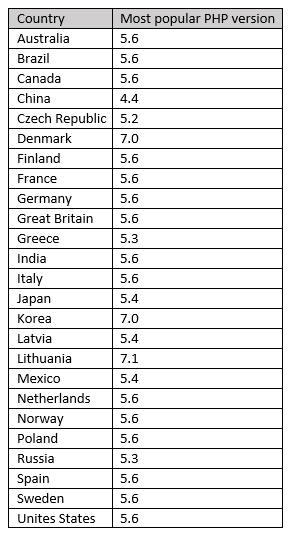
Table of all countries and corresponding PHP versions

What the PHP Popularity Research Results mean for Plesk customers

The stats above prove that now’s too early to talk about ending support of PHP versions 5.2 – 5.6. At the same time, we should definitely push customers in this direction. From our side, we at Plesk do our best to make the transition to the new PHP as comfortable and painless as possible. Besides warning of outdated PHP, we do the following:

  • For default settings, we take into account which PHP version is provided by OS vendor.
  • If the OS vendor doesn’t provide the latest PHP version, we add the set of PHP handlers and provide a complete set. Including old and new versions.
  • In new installations, we offer the latest PHP versions. But we don’t switch automatically while upgrading from old Plesk versions, so as not to break working sites.

These steps already work because in our stats we see an upward trend in popularity of the latest PHP versions. PHP 7.0 replaced 5.5 from the top 3, and PHP 7.1 entered top 5 list.  This means we’re heading in the right direction. So will you move forward with us?

Do you prefer an old PHP to a new one? Please share in the comments!

The post Our PHP versions popularity research – and unexpected results appeared first on Plesk.

└ Tags: outdated PHP versions, PHP, PHP 7.0, PHP 7.2, PHP Upgrade, Plesk news and announcements, Plesk php
 Comment 

Fedora 27: perl-Archive-Zip Security Update

Jul21
by Ike on July 21, 2018 at 1:21 pm
Posted In: Other

(Jul 19) This release fixes a directory and symbolic link traversal vulnerability in Archive::Zip::Archive Perl module that allows an attacker to writite into an arbitrary file accesible by a local user.

 Comment 

Fedora 28: openslp Security Update

Jul21
by Ike on July 21, 2018 at 1:15 pm
Posted In: Other

(Jul 19) Fix heap memory corruption, CVE-2017-17833

 Comment 

RedHat: RHSA-2018-2225:01 Moderate: fluentd security update

Jul21
by Ike on July 21, 2018 at 12:27 pm
Posted In: Other

(Jul 19) An update for fluentd is now available for Red Hat OpenStack Platform 13.0 Operational Tools for Red Hat Enterprise Linux 7. Red Hat Product Security has rated this update as having a security impact of Moderate. A Common Vulnerability Scoring System (CVSS) base score, which

 Comment 
  • Page 2,220 of 2,975
  • « First
  • «
  • 2,218
  • 2,219
  • 2,220
  • 2,221
  • 2,222
  • »
  • Last »

What’s New?

  • Fedora 41: Apptainer CVE-2025-65105 Security Fix Advisory
  • Fedora 43: Apptainer 1.4.5 Important Fix CVE-2025-65105
  • Ubuntu 18.04: USN-7907-5 Linux Kernel Important Security Flaws
  • Debian: Chromium Important DSA-6080-1 Code Exec DoS Issues
  • Fedora 42: SingularityCE Important Upgrade 4.3.5 – FEDORA-2025-54d78b9fed
  • Fedora 43: perl-Alien-Brotli Critical Security DoS Fix 2025-d93200cf16
  • Fedora 42: Wireshark 4.6.1 Critical Issue Advisory – FEDORA-2025-f810869906
  • Fedora 42: yarnpkg Command Injection Fix CVE-2025-64756 Advisory
  • Ubuntu 25.10: Linux Kernel Critical Flaws Security Patch USN-7906-3
  • Ubuntu 22.04: USN-7889-6 Linux Kernel Important Security Patch
  • Ubuntu 22.04 LTS: Linux Kernel Critical Security Issues USN-7928-3
  • Ubuntu 22.04: 7928-2 Linux Kernel FIPS Security Updates
  • Ubuntu 22.04 LTS: USN-7928-1 Linux Kernel Critical Security Issues
  • Debian: Important DoS Vulnerabilities in FFmpeg DSA-6080-1 Advisory
  • Ubuntu 20.04 LTS: USN-7922-1 Linux Kernel Important Security Issues
  • Ubuntu 24.04 LTS: Kernel Important Security Fixes USN-7921-1 CVE-2025-39946
  • Debian: firefox-esr Critical Privilege Escalation DSA-6078-1 CVE-2025-14321
  • 2026 Global Partner Program Announcement
  • Debian: pdns-recursor Critical Denial of Service Vulnerability DSA-6077-1
  • Debian: libpng1.6 Critical Info Leak & DoS Vulnerabilities DSA-6076-1
  • Fedora 43: python3-docs Update 2025-e235793f10 – Maintenance Release
  • Fedora 43: python3.14 Critical Update Addresses Quadratic Complexity Bug
  • Debian: WordPress Important XSS and Info Disclosure DSA-6075-1
  • Ubuntu 22.04 LTS: fontTools Important Path Traversal Risk CVE-2025-66034
  • Debian: webkit2gtk Critical Info Exfiltration DSA-6074-1 CVE-2025-13947

Search

Translator

Tags

Business and industry code Community cPanel CVE Debian Debian Linux Distribution - Security Advisories Development Events Fedora Fedora Linux Distribution - Security Advisories General Hosting Important Advisory Linux Moderate Advisory Month in WordPress news Parallels Plesk Parallels Plesk Panel Performance PHP Plesk news and announcements Plesk Panel Podcast ProdDevSec Product and technology Products Project Release News Red Hat Red Hat Linux Distribution - Security Advisories Releases security Security Centre sensitive site Ubuntu Ubuntu Linux Distribution - Security Advisories update updates Various vulnerability Web Server Survey Wordpress wp-briefing

Posts

Helpful Links

  • Liquidweb.com
  • MYSQL Dev Documentation
  • Plugins
  • Source forge SED command
  • Themes
  • WordPress Documentation
  • You Tube
December 2025
M T W T F S S
« Nov    
1234567
891011121314
15161718192021
22232425262728
293031  
  • Google
  • Yahoo
  • Liquid Web
  • Storm
  • YouTube

©1999-2025 Ike.ninja | Powered by WordPress with Easel | Subscribe: RSS | Back to Top ↑

50 queries. 8.75 mb Memory usage. 0.621 seconds.