Book Mark

Ike.ninja

Linux Fun
  • Home
  • How to
  • Reference Links
  • Categories
    • Releases
    • Plesk
    • Community
    • CMS
    • security
    • MYSQL
    • cPanel
  • Tools
    • IP Checker
    • Byte Converter
RSS

How to set up Managed WordPress Hosting [Video]

Jul20
by Ike on July 20, 2018 at 10:02 am
Posted In: Managed Hosting, Managed Hosting Services, managed Wordpress hosting, Plesk, Product and technology, Releases, WordPress plugins, wordpress themes

There’s so much more to WordPress websites than meets the eye: security, updates, speed, scalability, and more. Do you have the expertise for all the necessary technical gimmicks? Are you a seasoned pro, but lack the time? Either way, you probably want a turnkey website tailored to your needs. In this case, managed WordPress hosting is the right choice.

Benefits of managed WordPress hosting

Managed WordPress hosting is a particularly popular choice among small to medium-size companies. Example, those managing high-traffic blogs, or organisations looking for specialized enterprise WordPress hosting. Then, Managed WordPress hosting is a good investment because it:

  1. Reduces labour costs and time.
  2. Ensures a finer-tuned CMS.
  3. Guarantees round-the-clock site maintenance.
  4. Updates WordPress installations and plugins.
  5. Runs daily backups and security scans.

Plesk offers providers a Managed WordPress Hosting solution

The Plesk WordPress Toolkit has key features for managed WordPress hosting. So you Plesk Hosting Providers can offer customers a turnkey WordPress environment. One where you can preinstall WordPress on your customers’ newly created domains with selected plugins and themes, tailored to customers.

Extremely useful because customers receive WordPress websites with a personalized look and functionality. And ready-to-use WordPress instances immediately available after your first login. So let’s cover the basic steps you need to follow to set up managed WordPress hosting. And get your website up and running in minutes.

How to set up Managed WordPress Hosting – The Tutorial

Here’s a brief overview of WordPress Toolkit features for managed WordPress hosting. With detailed step-by-step instructions. Have a look, give it a like, and keep reading below for more details.

Managed WordPress Hosting in Plesk is simple and we can divide it into two steps: First, creating and uploading a set of plugins and themes. And second, configuring a hosting plan.

1a. Create a new custom set of plugins and themes

First, we need to prepare a selection of themes and plugins to pre-install on your customers’ instances together with WordPress.With the WordPress Toolkit, you can do this with ‘sets’ – which are kind of like empty boxes that you stuff with the themes/plugins you want your customers to have.

  1. Go to WordPress > Sets Tab
  2. Create Set
  3. Name your set (which is now empty)
  4. Navigate under ‘Add Plugins’
  5. Select your plugins and themes
  6. Click ‘Create’

Pick plugins that can enhance customers’ WordPress experience. For example, choose any WordPress caching plugin. This can significantly improve website’s performance.

To save time, you can use the two sets we pre-installed by default. The “WordPress Essentials” and “E-Commerce pack” sets speak for themselves. They can suit any website and E-Commerce website respectively. You can also use these without creating a new set.
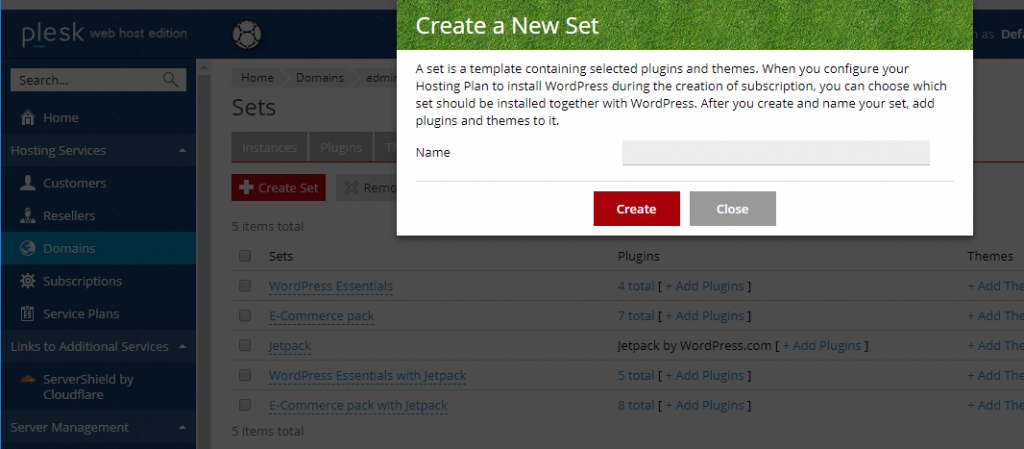
Create a new plugin or theme set - managed wordpress hosting with Plesk
Note the skin we donned for the World Cup 😉 Forget about default yearly “Twenty” themes and choose a fresh look.

1B. Uploading Custom Plugins and Themes

How else can you pre-configure WordPress instances of your customers? You can upload custom plugins and themes. Useful if you can’t find a suitable plugin or theme in the wordpress.org repository, or you need to install your own.

Plugins and themes you upload become available for customers to install in the ‘Plugins’ tab and they can’t remove them. Uploaded plugins and themes are marked with the ↓ icon. While uploading a plugin or a theme, you can choose if you want to add it to an existing set or not.
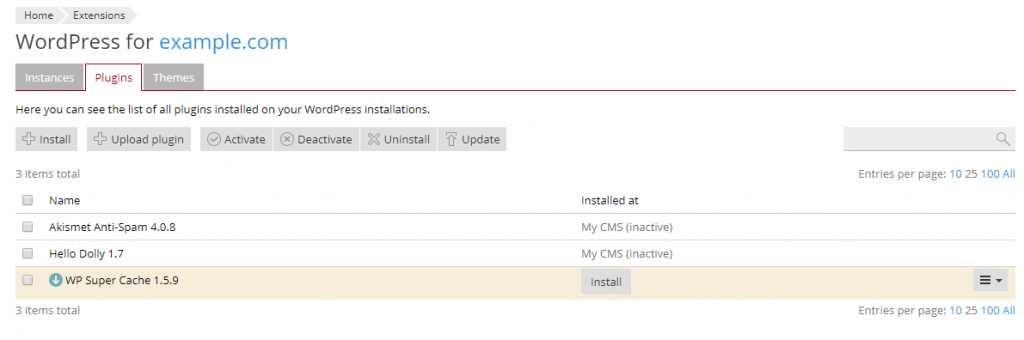
uploading custom plugins and themes - managed WordPress hosting - Plesk

You add themes in a similar way you would plugins. But using the ‘Add Theme’ function instead. Additionally, any uploaded themes will also become available to install. The plugin and theme set’s now almost ready. So let’s look at the second stage – how to configure a hosting plan.

2. Configuring a hosting plan

You do it to automatically install WordPress together with your set every time there’s a new subscription created.

  1. Leave WordPress Toolkit (!).
  2. Go to Service Plans
  3. Stay on the “Hosting Plans” tab
  4. Click the hosting plan under which you want to have subscriptions with pre-installed WordPress.
  5. Then go to the “Additional Services” tab.
  6. Under WordPress Toolkit, select “Install WordPress with the … set” (your choice)
  7. When you have selected your option, click Update & Sync.
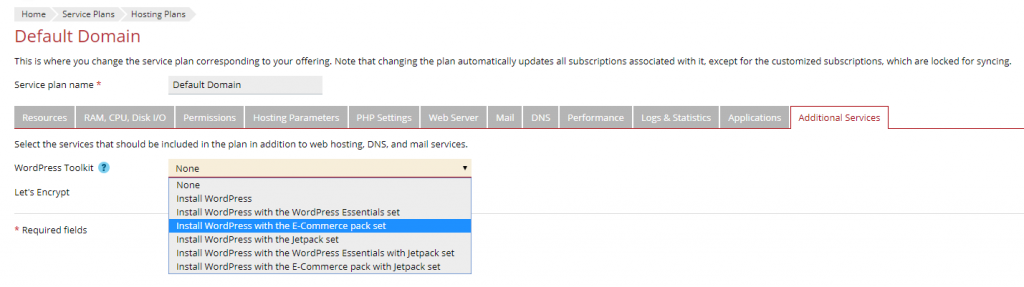
create custom plugins and themes - Managed WordPress Hosting - Plesk

Congratulations! Now each new subscription created under this hosting plan will have pre-installed WordPress with your selected plugins and themes. Existing WordPress instances will not be affected by this process.

Why managed WordPress hosting is a top choice

There are multiple benefits to choosing to set up managed WordPress hosting over other options, like shared hosting or VPS hosting. Because the peace of mind associated with maintenance and data integrity far outweigh the costs to set up managed WordPress hosting.

As you can see, the setup process is very straightforward. Choose to install your sets when you create a WordPress instance using custom WordPress installation. Because this makes it all the more flexible and can be tailored to the needs of your own website.

The post How to set up Managed WordPress Hosting [Video] appeared first on Plesk.

└ Tags: Managed Hosting, Managed Hosting Services, managed Wordpress hosting, Product and technology, WordPress plugins, wordpress themes
 Comment 

Debian: DSA-4252-1: znc security update

Jul19
by Ike on July 19, 2018 at 12:44 pm
Posted In: Other

(Jul 18) Jeriko One discovered two vulnerabilities in the ZNC IRC bouncer which could result in privilege escalation or denial of service. For the stable distribution (stretch), these problems have been fixed in

 Comment 

Debian: DSA-4251-1: vlc security update

Jul19
by Ike on July 19, 2018 at 12:41 pm
Posted In: Other

(Jul 18) A use-after-free was discovered in the MP4 demuxer of the VLC media player, which could result in the execution of arbitrary code if a malformed media file is played.

 Comment 

Fedora 28: ceph Security Update

Jul19
by Ike on July 19, 2018 at 12:34 pm
Posted In: Other

(Jul 18) New release (1:12.2.6-1) Security fix for CVE-2018-1128 Security fix for CVE-2018-1129 Security fix for CVE-2018-10861

 Comment 

July 2018 Web Server Survey

Jul19
by Ike on July 19, 2018 at 12:20 pm
Posted In: Web Server Survey

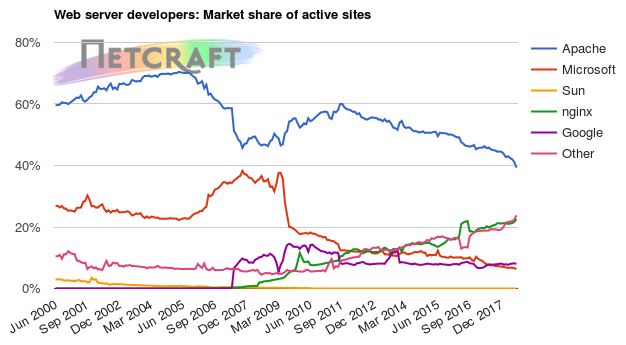
In the July 2018 survey we received responses from 1,663,673,364 sites, 220,573,018 unique domains, and 7,734,417 web-facing computers. This reflects a gain of 33.4 million sites, 2.80 million domains, and 120k web-facing computers.

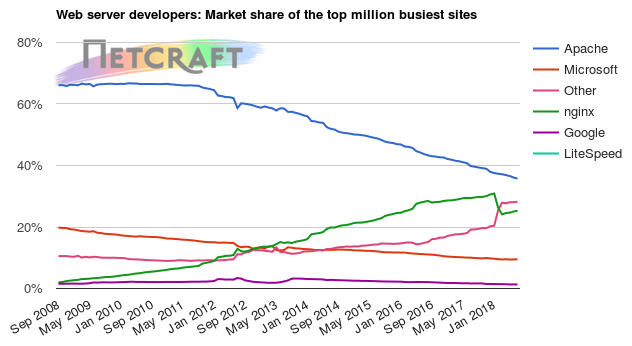
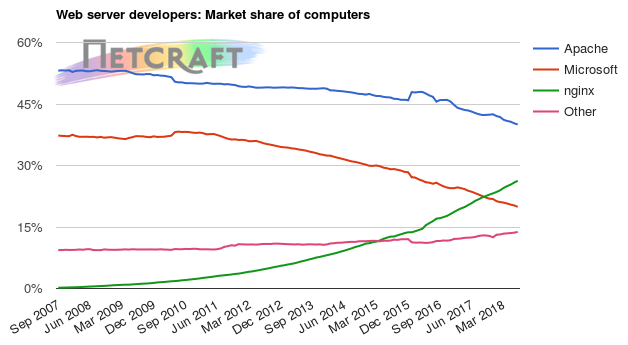
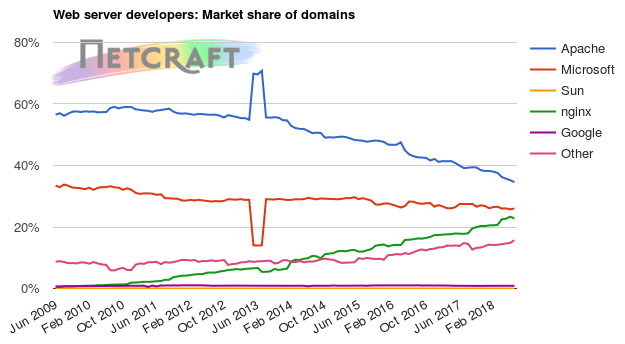
In the web-facing computer market, nginx experienced the largest increase (+3.24%), contributing more than half of the overall growth and surpassing two million web-facing computers this month. As a result, it was the only major vendor to experience a gain in market share. nginx also experienced the largest growth in terms of active sites (+7.87%), and top million sites (+0.71%), further increasing its market share in those metrics. Although nginx has slightly fewer domains than last month, it is generally seeing long-term growth in all metrics, and has gained around 10 million domains over each of the past three years.

Apache remains ahead in terms of domains, active sites, web-facing computers, and sites within the top million. However, it continues to see both long and short-term losses in many metrics, with steadily decreasing counts of domains (-0.53%), active sites (-1.15%), and top million sites (-0.98%).

Microsoft’s server software leads by total number of sites, of which it had 670 million this month (a 40.28% share), but sits behind Apache and nginx in most other metrics. Microsoft retains second place in total number of domains with a 26.02% market share, and experienced the largest increase this month of nearly 1.4 million domains. This has increased the gap between it and third-placed nginx, which has been steadily gaining on Microsoft, now leaving them 3.24 percentage points apart.

The one metric in which all major vendors continue to see ubiquitous long-term growth is web-facing computers. Since July 2017, the total number of web-facing computers has increased by 1.14 million (+17.3%). This rate of growth is more than double that seen in the year before between July 2016 and July 2017. Although there have been overall increases in the number of computers running Apache and Microsoft webservers, both have continued to lose market share to their faster growing competitor, nginx.

Google’s .app TLD takes off

.app is one of many new gTLDs from ICANN’s New gTLD Program. ICANN appointed control of the .app TLD to Google after it won the rights in a $25 million auction against twelve other applicants in February 2015. Google hopes that the appropriately named .app TLD will appeal to websites providing applications and application-related services.

The .app TLD only opened for public registration fairly recently on the 8th May 2018. This month’s survey found 185k unique domains running websites under the .app TLD. Whilst many of these domains return parking pages, a number of fully-fledged sites, such as cash.app, have already been launched, with the Netcraft survey detecting over 15k active sites.

One of .app’s marketed features is its inclusion within browsers’ HTTP Strict Transport Security (HSTS) preload lists. The .app TLD is one of only thirteen where an HSTS preload policy has been applied to a whole TLD. This TLD-wide HSTS policy means that modern browsers will only access .app websites over a secure HTTPS connection, protecting users from trivial man-in-the-middle attacks.

Total number of websites

Web server market share

Developer June 2018 Percent July 2018 Percent Change
Microsoft 601,258,605 36.88% 670,209,364 40.28% 3.41
Apache 361,165,378 22.15% 366,023,119 22.00% -0.15
nginx 336,529,382 20.64% 287,045,450 17.25% -3.39
Google 22,946,307 1.41% 23,347,290 1.40% -0.00

Web server market share for active sites

Developer June 2018 Percent July 2018 Percent Change
Apache 73,047,202 41.13% 72,209,166 39.30% -1.83
nginx 38,430,049 21.64% 41,454,376 22.56% 0.92
Google 14,525,401 8.18% 14,745,102 8.02% -0.15
Microsoft 11,757,813 6.62% 11,660,970 6.35% -0.27

For more information see Active Sites

Web server market share for top million busiest sites

Developer June 2018 Percent July 2018 Percent Change
Apache 355,382 35.54% 351,914 35.19% -0.35
nginx 246,812 24.68% 248,553 24.86% 0.17
Microsoft 93,092 9.31% 93,614 9.36% 0.05
LiteSpeed 15,019 1.50% 15,422 1.54% 0.04
Web server market share for computers

Developer June 2018 Percent July 2018 Percent Change
Apache 3,067,313 40.28% 3,094,363 40.01% -0.27
nginx 1,967,886 25.84% 2,031,813 26.27% 0.43
Microsoft 1,543,179 20.27% 1,540,470 19.92% -0.35
Web server market share for domains

Developer June 2018 Percent July 2018 Percent Change
Apache 76,721,597 35.23% 76,312,577 34.60% -0.63
Microsoft 56,030,491 25.73% 57,395,894 26.02% 0.29
nginx 50,860,718 23.35% 50,246,244 22.78% -0.57
Google 1,909,658 0.88% 1,948,858 0.88% 0.01
└ Tags: Web Server Survey
 Comment 
  • Page 2,222 of 2,975
  • « First
  • «
  • 2,220
  • 2,221
  • 2,222
  • 2,223
  • 2,224
  • »
  • Last »

What’s New?

  • Fedora 41: Apptainer CVE-2025-65105 Security Fix Advisory
  • Fedora 43: Apptainer 1.4.5 Important Fix CVE-2025-65105
  • Ubuntu 18.04: USN-7907-5 Linux Kernel Important Security Flaws
  • Debian: Chromium Important DSA-6080-1 Code Exec DoS Issues
  • Fedora 42: SingularityCE Important Upgrade 4.3.5 – FEDORA-2025-54d78b9fed
  • Fedora 43: perl-Alien-Brotli Critical Security DoS Fix 2025-d93200cf16
  • Fedora 42: Wireshark 4.6.1 Critical Issue Advisory – FEDORA-2025-f810869906
  • Fedora 42: yarnpkg Command Injection Fix CVE-2025-64756 Advisory
  • Ubuntu 25.10: Linux Kernel Critical Flaws Security Patch USN-7906-3
  • Ubuntu 22.04: USN-7889-6 Linux Kernel Important Security Patch
  • Ubuntu 22.04 LTS: Linux Kernel Critical Security Issues USN-7928-3
  • Ubuntu 22.04: 7928-2 Linux Kernel FIPS Security Updates
  • Ubuntu 22.04 LTS: USN-7928-1 Linux Kernel Critical Security Issues
  • Debian: Important DoS Vulnerabilities in FFmpeg DSA-6080-1 Advisory
  • Ubuntu 20.04 LTS: USN-7922-1 Linux Kernel Important Security Issues
  • Ubuntu 24.04 LTS: Kernel Important Security Fixes USN-7921-1 CVE-2025-39946
  • Debian: firefox-esr Critical Privilege Escalation DSA-6078-1 CVE-2025-14321
  • 2026 Global Partner Program Announcement
  • Debian: pdns-recursor Critical Denial of Service Vulnerability DSA-6077-1
  • Debian: libpng1.6 Critical Info Leak & DoS Vulnerabilities DSA-6076-1
  • Fedora 43: python3-docs Update 2025-e235793f10 – Maintenance Release
  • Fedora 43: python3.14 Critical Update Addresses Quadratic Complexity Bug
  • Debian: WordPress Important XSS and Info Disclosure DSA-6075-1
  • Ubuntu 22.04 LTS: fontTools Important Path Traversal Risk CVE-2025-66034
  • Debian: webkit2gtk Critical Info Exfiltration DSA-6074-1 CVE-2025-13947

Search

Translator

Tags

Business and industry code Community cPanel CVE Debian Debian Linux Distribution - Security Advisories Development Events Fedora Fedora Linux Distribution - Security Advisories General Hosting Important Advisory Linux Moderate Advisory Month in WordPress news Parallels Plesk Parallels Plesk Panel Performance PHP Plesk news and announcements Plesk Panel Podcast ProdDevSec Product and technology Products Project Release News Red Hat Red Hat Linux Distribution - Security Advisories Releases security Security Centre sensitive site Ubuntu Ubuntu Linux Distribution - Security Advisories update updates Various vulnerability Web Server Survey Wordpress wp-briefing

Posts

Helpful Links

  • Liquidweb.com
  • MYSQL Dev Documentation
  • Plugins
  • Source forge SED command
  • Themes
  • WordPress Documentation
  • You Tube
December 2025
M T W T F S S
« Nov    
1234567
891011121314
15161718192021
22232425262728
293031  
  • Google
  • Yahoo
  • Liquid Web
  • Storm
  • YouTube

©1999-2025 Ike.ninja | Powered by WordPress with Easel | Subscribe: RSS | Back to Top ↑

50 queries. 8.75 mb Memory usage. 0.311 seconds.