Book Mark

Ike.ninja

Linux Fun
  • Home
  • How to
  • Reference Links
  • Categories
    • Releases
    • Plesk
    • Community
    • CMS
    • security
    • MYSQL
    • cPanel
  • Tools
    • IP Checker
    • Byte Converter
RSS

RedHat: RHSA-2018-1737:01 Important: kernel security and bug fix update

May30
by Ike on May 30, 2018 at 7:26 am
Posted In: Other

(May 29) An update for kernel is now available for Red Hat Enterprise Linux 7.3 Extended Update Support. Red Hat Product Security has rated this update as having a security impact of Important. A Common Vulnerability Scoring System (CVSS) base score,

 Comment 

RedHat: RHSA-2018-1738:01 Important: kernel security, bug fix,

May30
by Ike on May 30, 2018 at 7:26 am
Posted In: Other

(May 29) An update for kernel is now available for Red Hat Enterprise Linux 7.4 Extended Update Support. Red Hat Product Security has rated this update as having a security impact of Important. A Common Vulnerability Scoring System (CVSS) base score,

 Comment 

Now available: Here’s how to install Plesk on Linode

May29
by Ike on May 29, 2018 at 4:39 pm
Posted In: Install Plesk on Linode, Linode, New Plesk Onyx, Plesk, Plesk on Linode, Plesk Onyx, Product and technology, Releases

Cloud companies, like Linode, are now revolutionizing how businesses reach their customers. From digitizing painful, outdated processes to allowing more time to focus on what you really care about. This is what makes their products unique. Now you can combine it with Plesk for a complete solution. So here’s how to install Plesk on Linode in a swish.

As a Web Professional, your goal is to provide your customers with available and scalable services. And this is true whether you’re a developer, designer, digital agency or an IT Admin. You want to be able to focus on the things you’re good at. On coding, or maybe improving your product or service offering. Maybe you’re just tired of handling and maintaining all the infrastructure and security.

So you want to be able to leave the nitty gritty in the hands of a specially-designed virtual private server. A VPS will manage your technical server, cost streamlining, running instances, backups, and accounts. In short, if you want to redirect your efforts elsewhere, the new Plesk Onyx is the ideal solution.

What’s Linode?

Linode Logo - Install Linode on Plesk

Linode is an Infrastructure-as-a-Service (IaaS) provider company based in New Jersey, USA. They offer multiple products and services for clients. The flagship products are IaaS solutions with multiple VM sizes at different price points and hourly billing.

In addition, Linode Backup allows customers to backup their servers on a daily, weekly, or monthly basis. Linode Manager and NodeBalancer both allow users to manage multiple server instances across a single system. You can learn more about Linode here.

Getting started: Before you install Plesk on Linode

If you want to install Plesk on Linode, note that you first need to review the Software Requirements for Plesk. Because you need to find out what Linux distributions we support. Generally, we enable a community Stack Script at Linode. So Plesk will automatically install for either Ubuntu 16.x or CentOS 7.x in their latest versions.

Unfortunately, Linode currently has no option to implement a Plesk image for deployment. So, the Stack Script will take slightly longer than an image-based deployment. But it makes it much easier for you and we added some nice pre-configurations too! ☺ So here’s your step-by-step guide.

How to install Plesk on Linode in a jiffy

How to install Plesk on Linode - Step1
  1. Log into your Linode Account and create a Linode of your preferred size.
How to install Plesk on Linode - Step2

2. After the Linode is created, click on Dashboard under options for the Linode you want to install Plesk on.

How to install Plesk on Linode - Step 3

3. Click on Deploy using Stack Scripts

How to install Plesk on Linode - Step 4

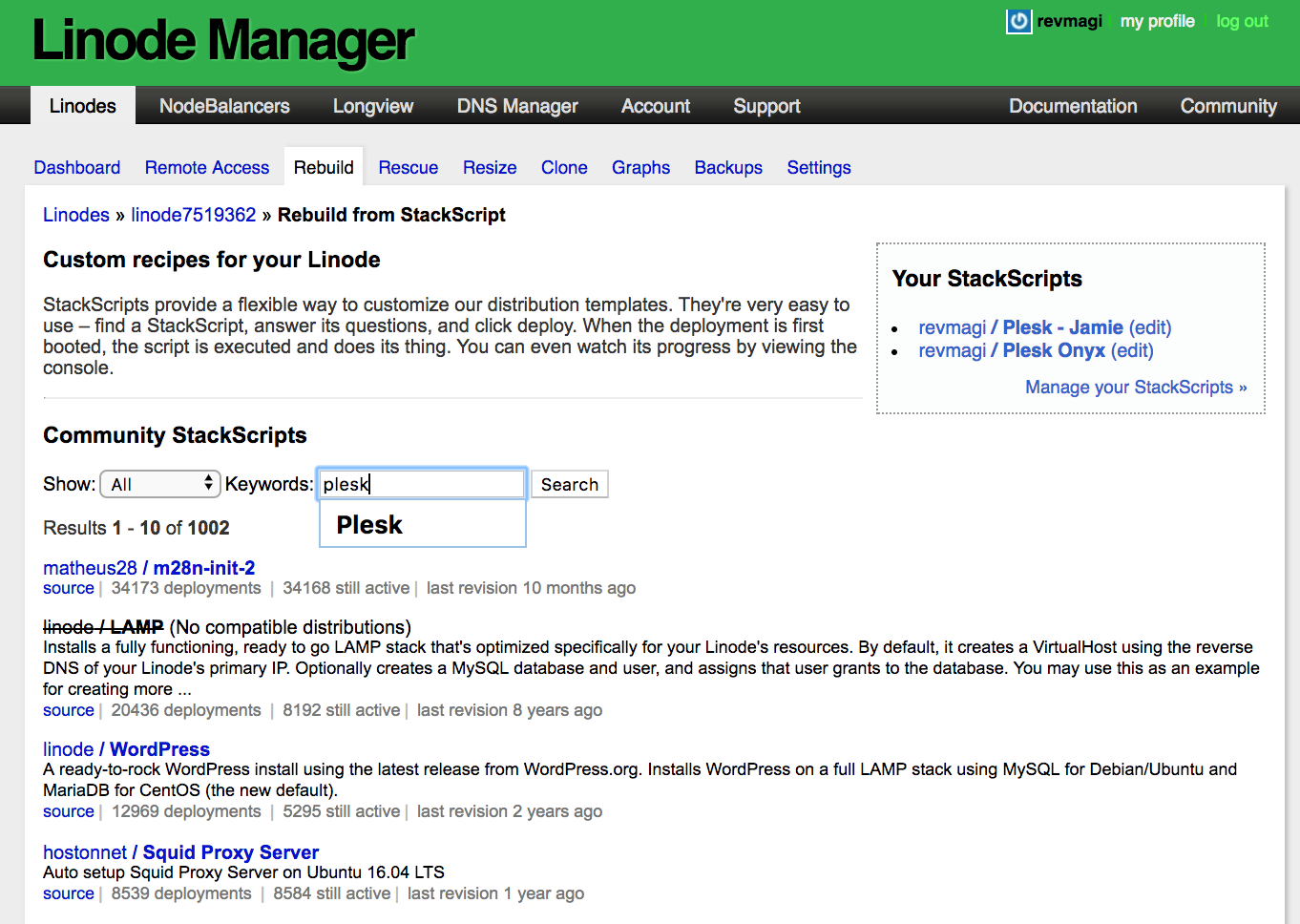
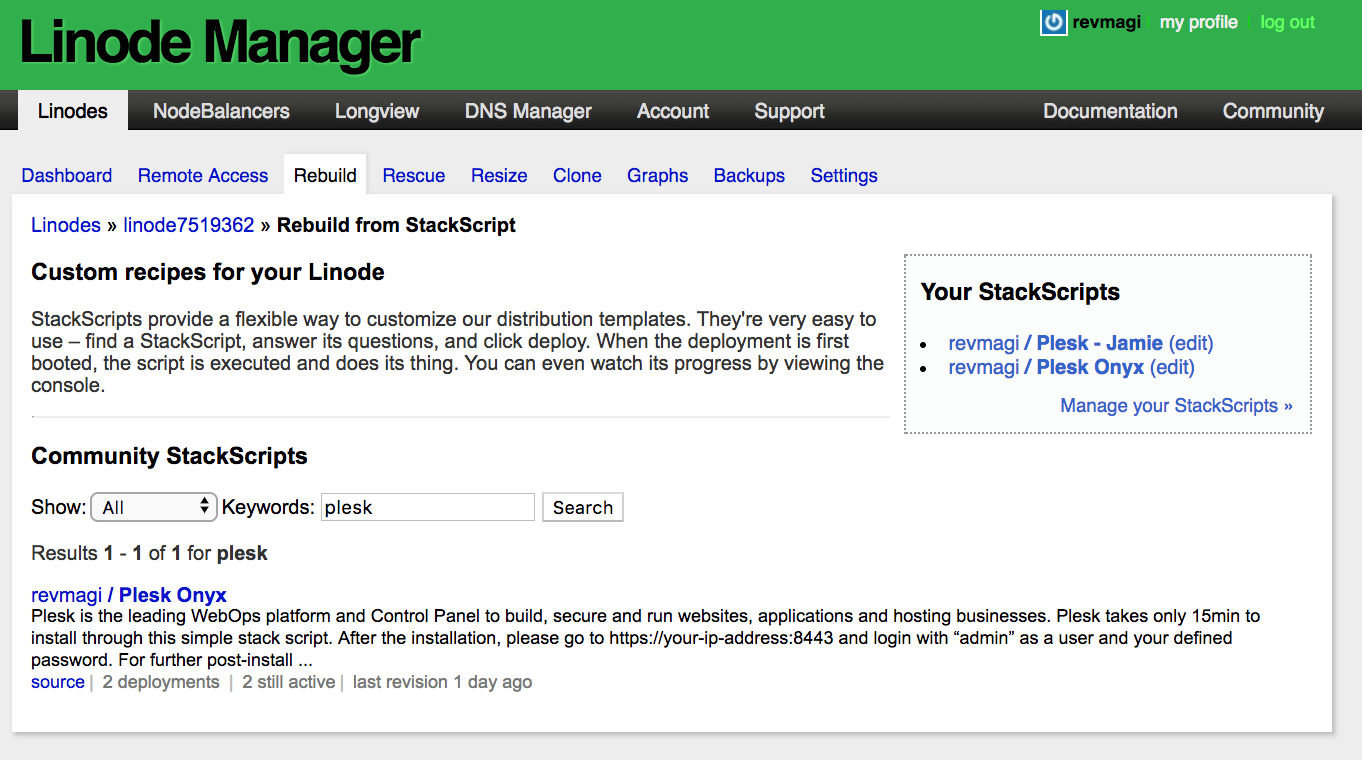
4. Type Plesk into Keyword Field and Click “Search”

5. Click on Plesk Onyx.

How to install Plesk on Linode - Step 5

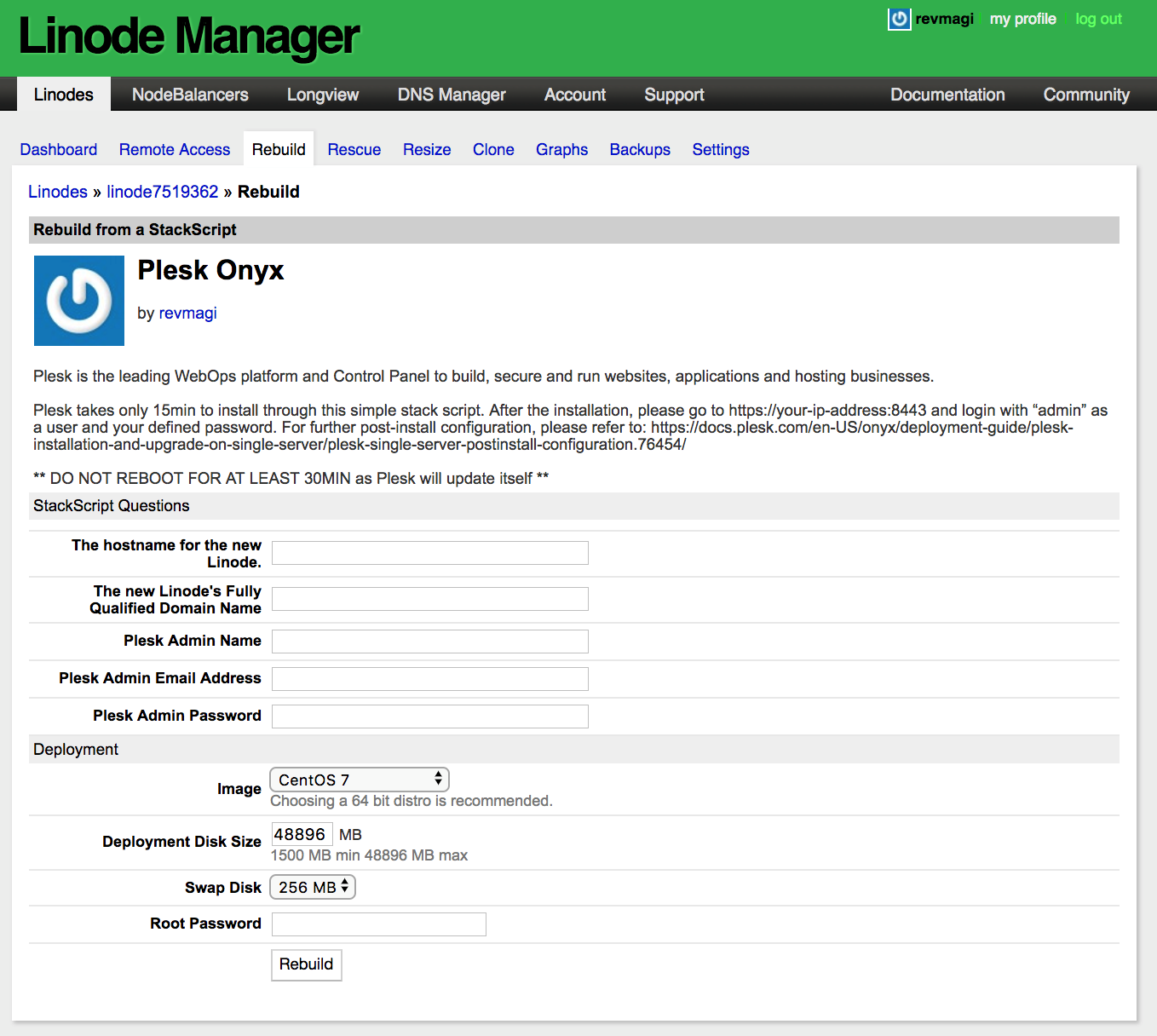
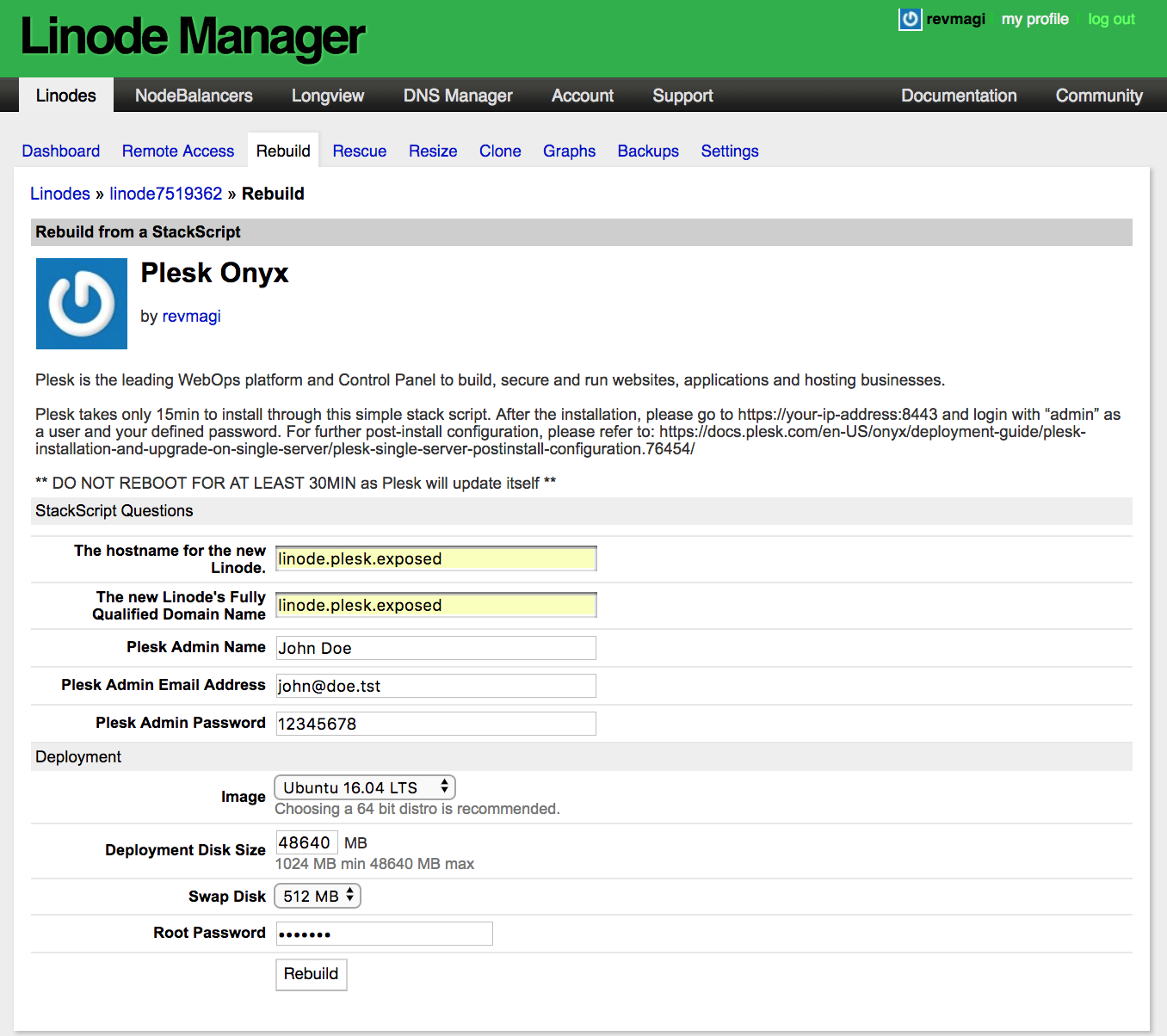
6. The Plesk Stack Script asks you to fill in basic information. Which will start the Plesk configuration, install a temporary license key and let you to login. All without needing an SSH to generate a password afterwards. Because you can define it upfront.

Leave all the other settings as default.

How to install Plesk on Linode - Step 6

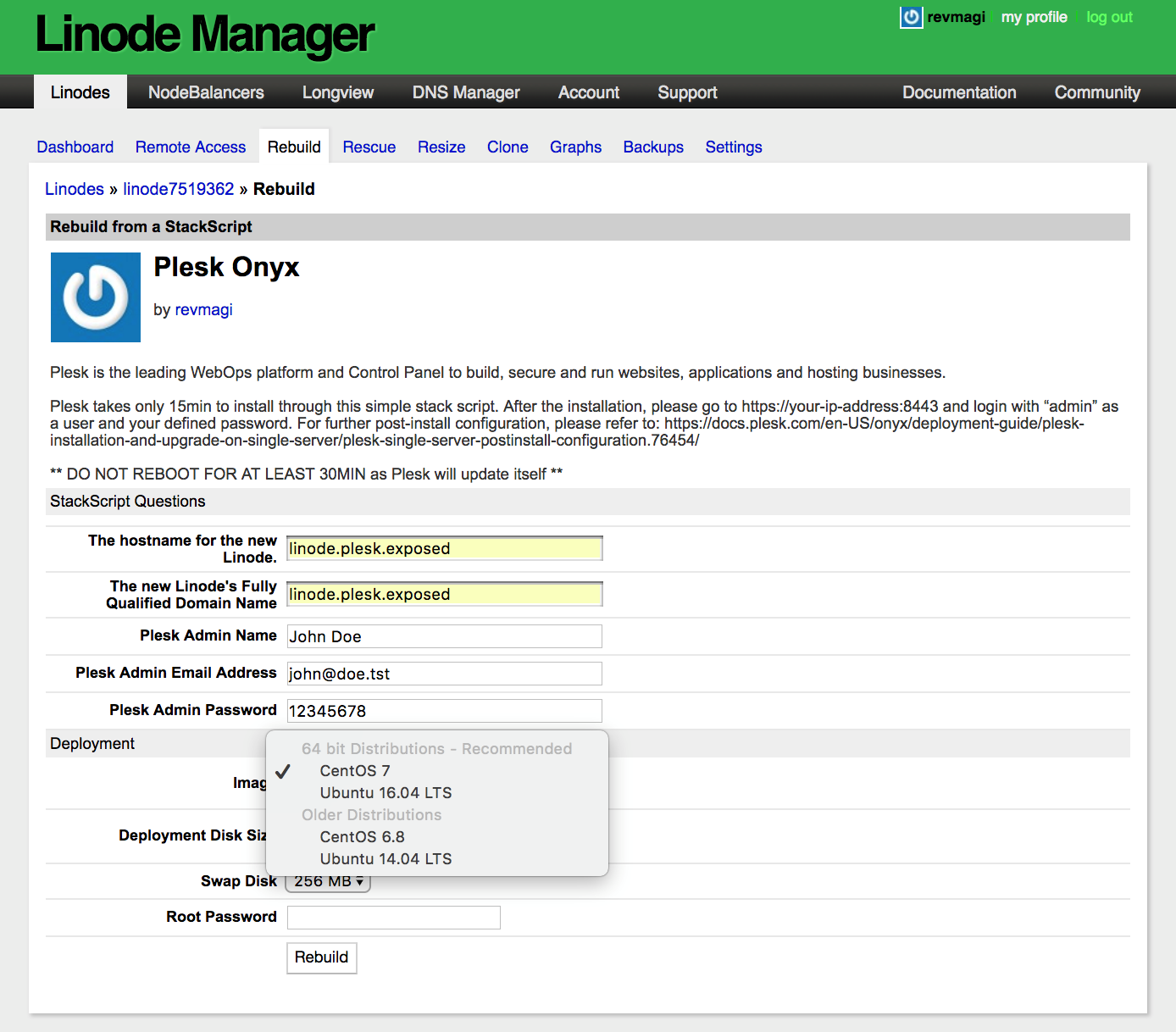
7. Select the OS of your choice. This Stack Script currently supports these OS versions inside Linode.

How to install Plesk on Linode - Step 7

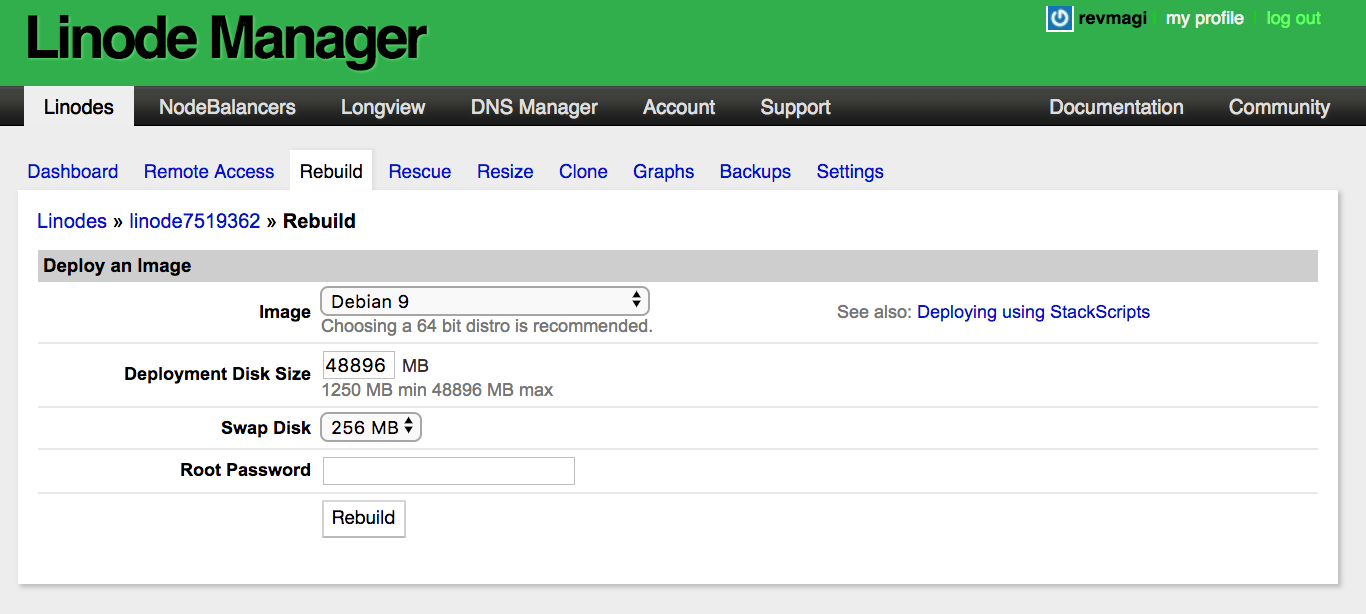
8. Then set your Root Password and click Rebuild.

How to install Plesk on Linode - Step 8

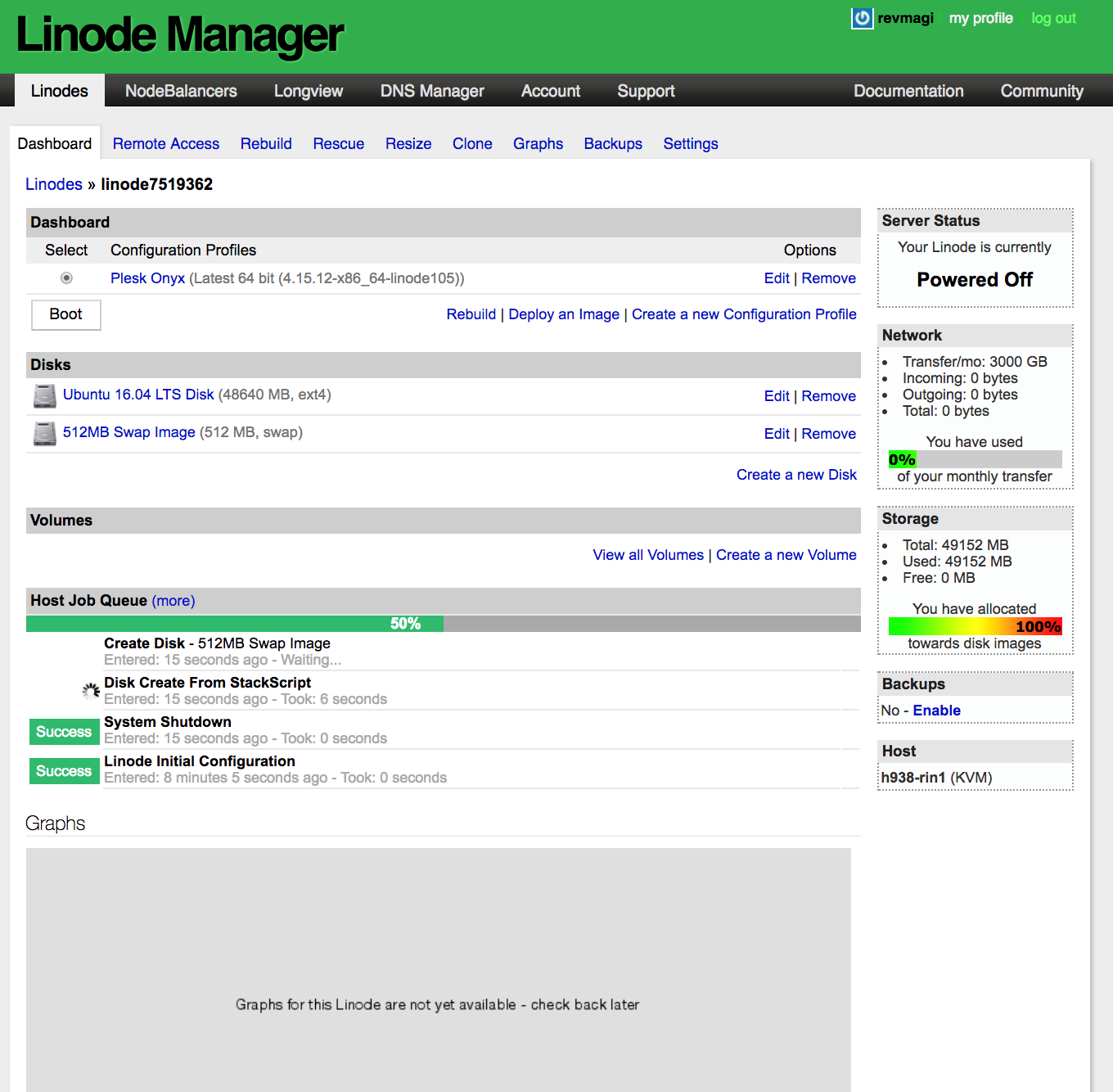
9. Linode removes the default disks and rebuilds with your OS choice. It also configures the information you provide to the Stack Script for first boot.

How to install Plesk on Linode - Step 9

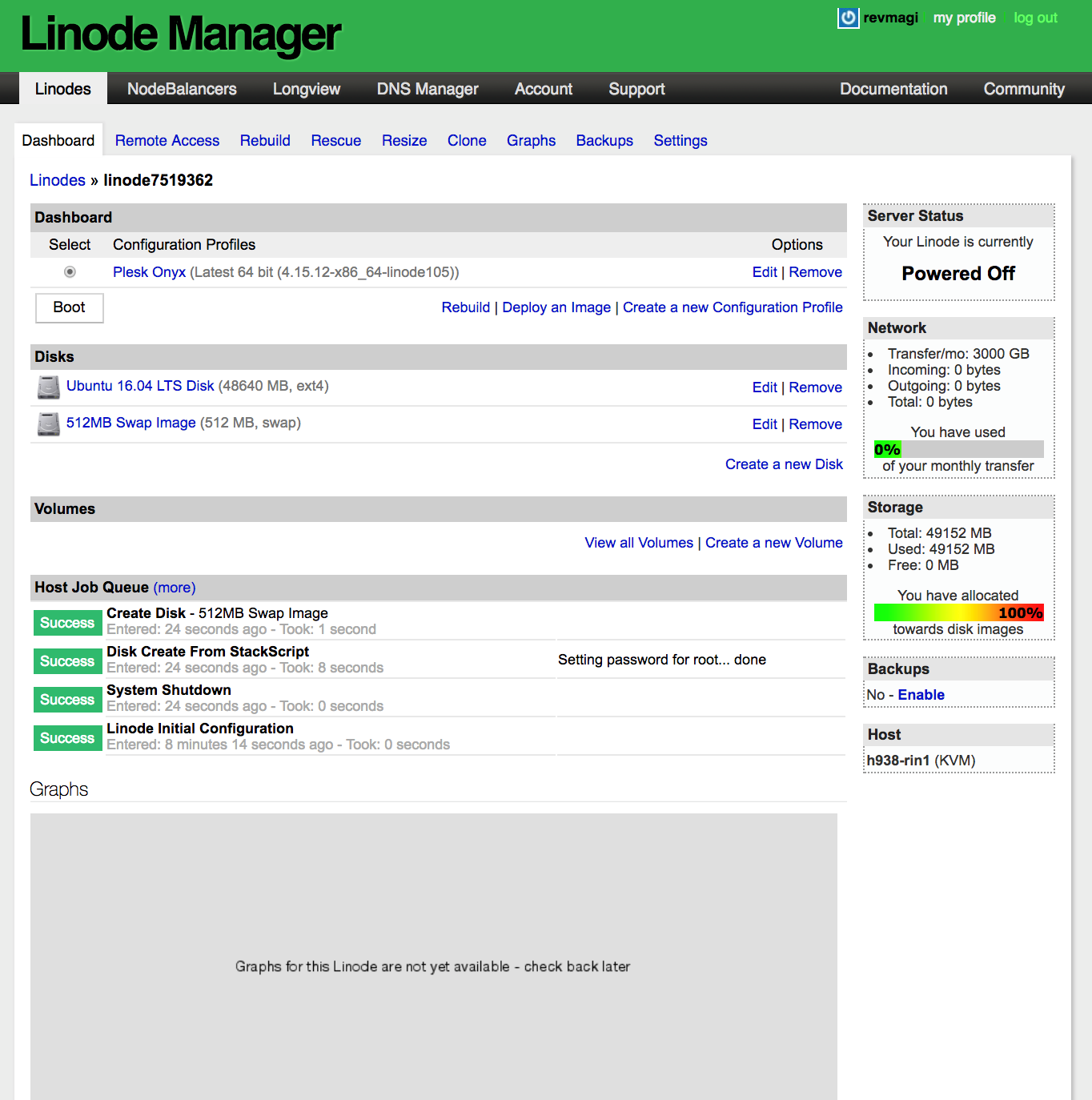
10. Click Boot. The server will start and the Stack Script will run.

This Plesk Stack Script could take about 10-15 minutes, depending on the VM CPU size you select. If there are many CPUs, it can go much faster. Again, unfortunately, Linode currently has no functionality for public images, like other hyperscale clouds have. But we hope that functionality will come soon because it would reduce the deployment to about 15-20 seconds instead. Much better, right? ☺

First, this script will configure your hostname, resolv.conf, and firewall settings. Then, it will install Plesk, initialize it, install the test license, configure ModSecurity, Plesk Firewall, Fail2ban, and more key extensions.

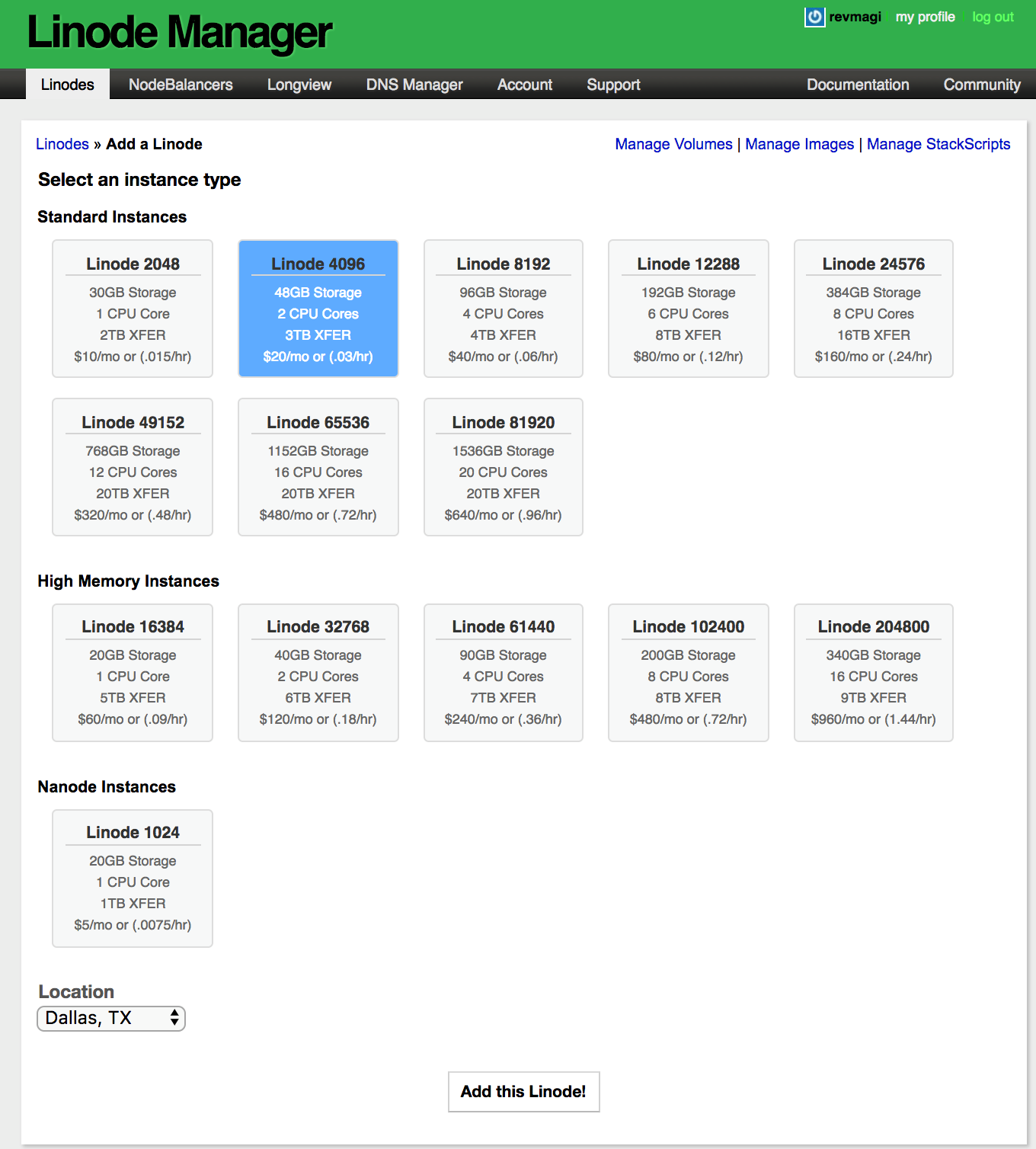
How to install Plesk on Linode - Step 10

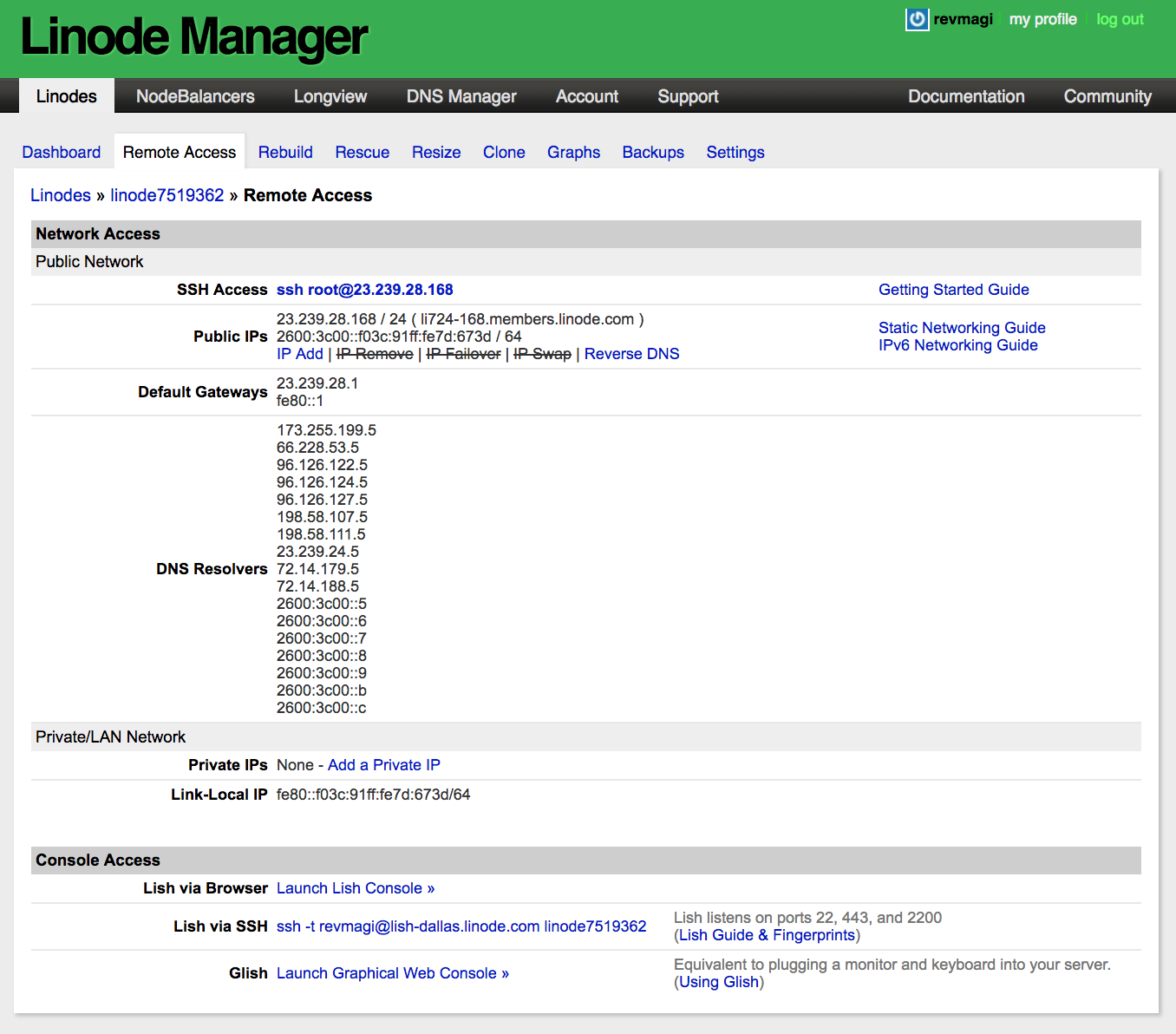
10. Want to watch the script process and see the notice when Plesk is finished installing? Then click on Launch Lish Console under the Remote Access tab.

When you finish, log into your clean Plesk install at https://<YourDomainOrIPAddress>:8443 with your user admin and the password you set in the previous step above.

As we said before, you’ll get a temporary Plesk license installed with the Stack Script. So if you want to explore whether a lasting Plesk license is better for you, do contact our team. We’ll guide you further, give you all your options and work out the best offer, including a shot at becoming a Plesk Partner. You can also check out our pricing options for a quick outlook. Otherwise, happy Plesking on Linode – and stay tuned for more!

The post Now available: Here’s how to install Plesk on Linode appeared first on Plesk.

└ Tags: Install Plesk on Linode, Linode, New Plesk Onyx, Plesk on Linode, Plesk Onyx, Product and technology
 Comment 

May 2018 Web Server Survey

May29
by Ike on May 29, 2018 at 2:35 pm
Posted In: Web Server Survey

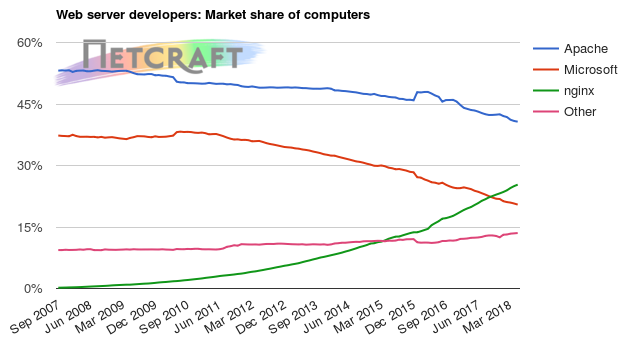
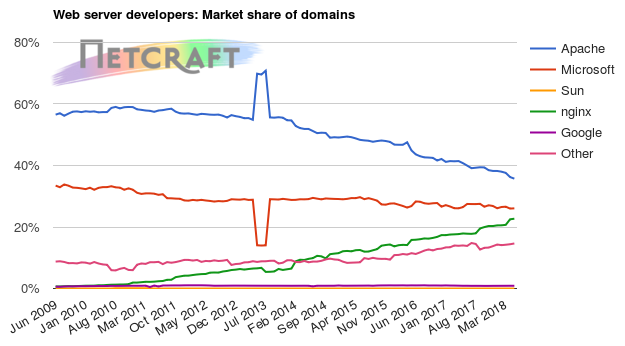
In the May 2018 survey we received responses from 1,584,940,345 sites, 217,875,435 unique domains, and 7,452,628 web-facing computers. This reflects a loss of 198 million sites, but a gain of 3.36 million domains and 65,600 web-facing computers.

nginx saw moderate growth this month, gaining 1.17 million unique domains. This has increased its market share of domains by 0.19 percentage points, even though it lost 44.2 million sites.

The nginx ecosystem has continued to evolve over the past month, with some notable software releases:

  • nginx 1.14.0 was released on the 17 April, which adds HTTP/2 server push support to the nginx stable stream (the recommended release stream for production web servers). HTTP/2 server push can improve the performance of some websites by pre-emptively pushing assets to browser clients, avoiding the need for the client to explicitly make additional GET requests for assets on a page such as images, stylesheets & JavaScript.
  • The first production-ready release of NGINX Unit 1.0 was released on the 12 April, ending the product’s beta period. NGINX Unit is a web application server that can serve sandboxed Go, Perl, PHP, Python and Ruby applications on the same server. It is unique in allowing dynamic reloading & remote configuration via a REST API rather than individual configuration files. A bugfix release, NGINX Unit 1.1, was subsequently made available on 26 April.
  • MySQL monitoring support was added to NGINX Amplify on 23 April. This commercial SaaS monitoring product from NGINX Inc. could increase the appeal of transitioning MySQL & PHP applications from Apache-based stacks to nginx-based ones.

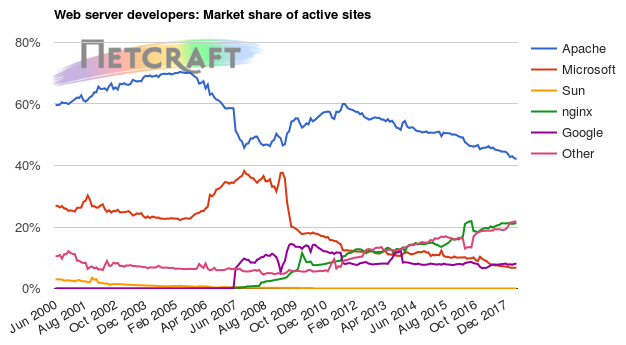
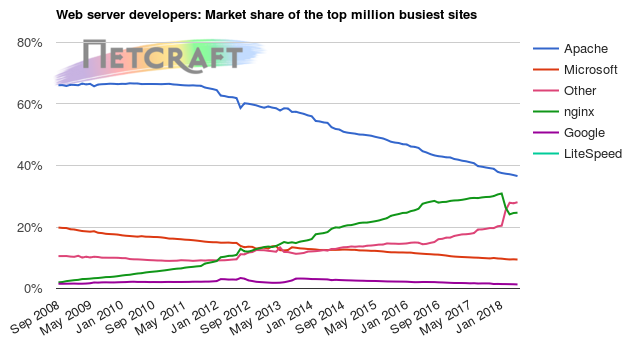
Despite losing 59.7 million sites this month, Apache still powers sites on the largest number of unique domains. Apache is also running on 36% of the world’s top 1 million websites – 12 percentage points ahead of its closest competitor, nginx.

There was also a 21% reduction of the number websites running Microsoft web server software this month, with the majority of these losses (77%) coming from hosting provider Raksmart, which lost 107 million of these sites. Despite this, the hosting provider gained 49,600 domains that point to Microsoft web servers. Many of the lost websites featured automatically generated content, and so were not counted as Active Sites.

Total number of websites

Web server market share

Developer April 2018 Percent May 2018 Percent Change
Microsoft 658,800,756 36.94% 518,826,524 32.73% -4.21
Apache 456,169,336 25.58% 396,463,723 25.01% -0.57
nginx 403,381,961 22.62% 359,163,599 22.66% 0.04
Google 22,460,562 1.26% 22,427,752 1.42% 0.16

Web server market share for active sites

Developer April 2018 Percent May 2018 Percent Change
Apache 75,298,051 42.41% 73,936,582 42.04% -0.37
nginx 37,478,429 21.11% 37,427,068 21.28% 0.17
Google 14,159,867 7.97% 14,279,471 8.12% 0.14
Microsoft 11,935,138 6.72% 11,897,685 6.76% 0.04

For more information see Active Sites

Web server market share for top million busiest sites

Developer April 2018 Percent May 2018 Percent Change
Apache 363,431 36.34% 360,234 36.02% -0.32
nginx 241,869 24.19% 242,826 24.28% 0.10
Microsoft 93,533 9.35% 92,776 9.28% -0.08
LiteSpeed 14,676 1.47% 14,777 1.48% 0.01
Web server market share for computers

Developer April 2018 Percent May 2018 Percent Change
Apache 3,018,020 40.86% 3,032,131 40.69% -0.17
nginx 1,844,837 24.97% 1,887,507 25.33% 0.35
Microsoft 1,531,014 20.73% 1,525,059 20.46% -0.26
Web server market share for domains

Developer April 2018 Percent May 2018 Percent Change
Apache 77,731,493 36.24% 77,830,157 35.72% -0.51
Microsoft 55,746,915 25.99% 56,785,102 26.06% 0.08
nginx 48,269,102 22.50% 49,440,862 22.69% 0.19
Google 1,901,783 0.89% 1,913,702 0.88% -0.01
└ Tags: Web Server Survey
 Comment 

Ubuntu 3586-2: DHCP vulnerabilities

May29
by Ike on May 29, 2018 at 7:56 am
Posted In: Other

(May 28) Several security issues were fixed in DHCP.

 Comment 
  • Page 2,280 of 2,977
  • « First
  • «
  • 2,278
  • 2,279
  • 2,280
  • 2,281
  • 2,282
  • »
  • Last »

What’s New?

  • Fedora 43: assimp Library Critical CVE-2025-11277 Update
  • Fedora 43: util-linux Update 2.41.4 Urgent CVE-2025-14105
  • Ubuntu 20.04 LTS: Linux-azure-fips Critical VMSCAPE Exposure CVE-2025-40300
  • Ubuntu 20.04: Linux-Azure Critical Info Leak CVE-2025-40300 USN-7939-1
  • Fedora 42: usd 2025-447047dda8 OpenEXRCore Memory Issue CVE-2025-64181
  • Fedora 42: python3.14 Critical Update Advisory 2025-d5dffbf048
  • Ubuntu 18.04 LTS USN-7937-1 Linux-azure-fips Critical Threat
  • Ubuntu 24.04: Linux Kernel Critical Security Flaws USN-7936-1
  • Fedora 43: Firefox Update 2025-f20b9f321d – Aarch64 Crashes Fixed
  • Chromium Medium Problems in Password Manager and Toolbar for Fedora 42
  • Debian: vlc Critical Denial of Service and Code Execution DSA-6082-1
  • Debian: Thunderbird Critical Arbitrary Code Exec DSA-6081-1 CVE-2025-14321
  • Fedora 41: Apptainer CVE-2025-65105 Security Fix Advisory
  • Fedora 43: Apptainer 1.4.5 Important Fix CVE-2025-65105
  • Ubuntu 18.04: USN-7907-5 Linux Kernel Important Security Flaws
  • Debian: Chromium Important DSA-6080-1 Code Exec DoS Issues
  • Fedora 42: SingularityCE Important Upgrade 4.3.5 – FEDORA-2025-54d78b9fed
  • Fedora 43: perl-Alien-Brotli Critical Security DoS Fix 2025-d93200cf16
  • Fedora 42: Wireshark 4.6.1 Critical Issue Advisory – FEDORA-2025-f810869906
  • Fedora 42: yarnpkg Command Injection Fix CVE-2025-64756 Advisory
  • Ubuntu 25.10: Linux Kernel Critical Flaws Security Patch USN-7906-3
  • Ubuntu 22.04: USN-7889-6 Linux Kernel Important Security Patch
  • Ubuntu 22.04 LTS: Linux Kernel Critical Security Issues USN-7928-3
  • Ubuntu 22.04: 7928-2 Linux Kernel FIPS Security Updates
  • Ubuntu 22.04 LTS: USN-7928-1 Linux Kernel Critical Security Issues

Search

Translator

Tags

Business and industry code Community cPanel CVE Debian Debian Linux Distribution - Security Advisories Development Events Fedora Fedora Linux Distribution - Security Advisories General Hosting Important Advisory Linux Moderate Advisory Month in WordPress news Parallels Plesk Parallels Plesk Panel Performance PHP Plesk news and announcements Plesk Panel Podcast ProdDevSec Product and technology Products Project Release News Red Hat Red Hat Linux Distribution - Security Advisories Releases security Security Centre sensitive site Ubuntu Ubuntu Linux Distribution - Security Advisories update updates Various vulnerability Web Server Survey Wordpress wp-briefing

Posts

Helpful Links

  • Liquidweb.com
  • MYSQL Dev Documentation
  • Plugins
  • Source forge SED command
  • Themes
  • WordPress Documentation
  • You Tube
December 2025
M T W T F S S
« Nov    
1234567
891011121314
15161718192021
22232425262728
293031  
  • Google
  • Yahoo
  • Liquid Web
  • Storm
  • YouTube

©1999-2025 Ike.ninja | Powered by WordPress with Easel | Subscribe: RSS | Back to Top ↑

50 queries. 8.75 mb Memory usage. 0.494 seconds.