Certificate revocation is intended to convey a complete withdrawal of trust in an SSL certificate and thereby protect the people using a site against fraud, eavesdropping, and theft. However, some contemporary browsers handle certificate revocation so carelessly that the most frequent users of a site and even its administrators can continue using an revoked certificate for weeks or months without knowing anything is amiss. Recently, this situation was clearly illustrated when a busy e-commerce site was still using an intermediate certificate more than a week after its revocation.
SSL Certificates are used to secure communication between browsers and websites by providing a key with which to encrypt the traffic and by providing third-party verification of the identity of the certificate owner. There are varying levels of verification a third-party Certificate Authority (CA) may carry out, ranging from just confirming control of the domain name (Domain Validation [DV]) to more extensive identity checks (Extended Validation [EV]).
However, an SSL certificate — or any of the certificates which form a chain from the server’s certificate to a trusted root installed in the browser or operating system — may need to be revoked. A certificate should be revoked when it has had its private key compromised; the owner of the certificate no longer controls the domain for which it was issued; or the certificate was mistakenly signed. An attacker with access to an un-revoked certificate who also has access to the certificate’s private key can perform a man-in-the-middle (MITM) attack by presenting the certificate to unsuspecting users whose browsers will behave as if they were connecting to a legitimate site.
There are two main technologies for browsers to check the revocation status of a particular certificate: using the Online Certificate Status Protocol (OCSP) or looking up the certificate in a Certificate Revocation List (CRL). OCSP provides revocation information about an individual certificate from an issuing CA, whereas CRLs provide a list of revoked certificates and may be received by clients less frequently. Browser support for the two forms of revocation varies from no checking at all to the use of both methods where necessary.
On 30th April 2013 an intermediate certificate issued to Network Associates — which forms part of the chain from an individual certificate back to a trusted root — was revoked by RSA. The intermediate certificate was used to sign multiple McAfee SSL certificates including one for a busy e-commerce website, www.mcafeestore.com. Its revocation should have prevented access to all of the websites using the intermediate including the online store. However, more than a week later nobody had noticed: no tweets or news articles appeared and the certificate was still in place.
The certificate chain for mcafeestore.com, before it was replaced. The highlighted certificate, NAI SSL CA v1, was revoked on 30th April 2013
The intermediate certificate was revoked by RSA by adding its serial number, 54:99:05:bd:ca:2a:ad:e3:82:21:95:d6:aa:ee:b6:5a, to the corresponding CRL. None of the certificates in the chain provide a URL for OCSP, so using the CRL is the only option available. After the CRL was published, browsers should display an error message and prevent access to the website. The reality is somewhat different, however.
Business as usual in Firefox
Firefox does not download CRLs for websites which use the most popular types of SSL certificate (all types of certificate except EV which is usually displayed with a green bar). Without downloading the CRL, Firefox is happy to carry on as usual; letting people visit the website and transfer sensitive personal information relying on a certificate that is no longer valid. In any case even if OCSP were available, by default Firefox will only check the validity of the server’s certificate and not attempt to check the entire chain of certificates (again, except for EV certificates).
No warnings for mobile users either on Android or iOS
Mobile browsing now makes up a significant proportion of internet use. Neither Google Chrome on Android nor Safari on iOS present a warning to the user even after being reset. Safari on iOS does not make revocation checks at all except for Extended Validation certificates and did not make requests for the CRL which would have triggered the revocation error message.
Google Chrome: [left to right] default settings, revocation checks enabled on Windows, and revocation checks enabled on Linux
Google Chrome, by default, does not make standard revocation checks for non-EV certificates. Google does aggregate a limited number of CRLs and distributes this via its update mechanism but, at least currently, it does not list the certificate in question or indeed any of the other certificates revoked in the same CRL. For the majority of Chrome users with the default settings, as with Firefox, nothing will appear to be amiss.
For the security conscious, Google Chrome does have the option to enable proper revocation checks, but in this case the end result depends on the platform. On Windows, Google Chrome can make use of Microsoft’s CryptoAPI to fetch the CRL and it correctly prevents access to the site. However, RSA’s CRL is not delivered in the conventional way: instead of providing the CRL in a binary format, it is encoded into a text-based format which is not the accepted standard. Mozilla’s NSS — which is used by Firefox on all platforms and by Google Chrome on Linux — does not support the format. On Linux, Google Chrome does make a request for the CRL but cannot process the response and instead carries on as normal.
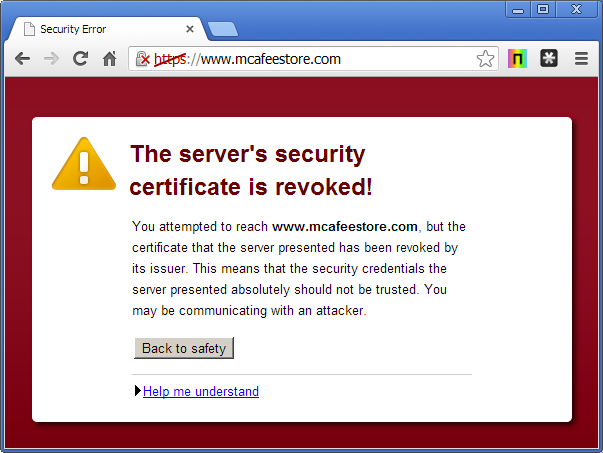
Warning to potential customers when visiting the store at https://www.mcafeestore.com
Microsoft’s web browser, Internet Explorer is one of the most secure browsers in this context. It fetches revocation information (with a preference for OCSP, but will fallback to CRLs) for the server’s certificate and the rest of the certificate chain and, as a consequence of the revocation check, it prevents the user from making their purchase on www.mcafeestore.com.
Opera preventing access to the website
Along with Internet Explorer, Opera is secure by default: it prevents access to the webpage. Opera checks the entirety of the certificate chain using either OCSP or CRLs where appropriate.
However, even with the most secure browser, the most frequent users of a secure website may be able to continue using a website for weeks or months despite one of the certificates in the chain of trust having been revoked. The CRL used in this case can be cached for up to 6 months, leaving frequent users, who will have a cached copy of the CRL, in the dark about the revocation. Going by previous copies of the CRL, the CRL may have last been generated in January 2013 and valid until July 2013. If that is the case and you have visited any website using the same intermediate certificate your browser will not display any warnings and will behave as if the certificate has not been revoked. However, you need not have visited mcafeestore.com before to have a cached CRL; there were 14 other websites with the same intermediate certificate in Netcraft’s latest SSL survey.
As long as six months sounds to miss out on important revocation information, browser vendors in control of the list of trusted CAs allow CRLs to have 12-month validity periods when destined for intermediate certificates. CRLs covering individual, or subscriber, certificates are required to be valid for at most 10 days. By its very nature access to the private key corresponding to an intermediate certificate is more useful to an attacker: he can use the private key to sign a certificate for any website he so chooses rather than having access to just a single site. Browsers do have the ability to distrust certificates if they become aware of the compromise, but they may depend on slow update mechanisms to update the trusted set of certificates.
Whilst it may be expensive for an online store to be using a certificate that should not be valid, the consequences for governmental or banking websites could be more severe. If the certificate, or one of the certificates in the chain, were revoked due to a key compromise and there is an active attacker exploiting the lack of revocation checking in modern browsers, the public could be at risk for an extended period of time. The state of revocation amongst modern browsers is sufficiently fragmented to ensure that the entire concept of revocation is on shaky ground — without consistent behaviour and timely updates, if or when the certificate is finally blocked it is too late.
Netcraft waited until the certificate was replaced before publishing this article.